DeskBot vs Invoice Ninja: Which Is Better in 2026?
A side-by-side comparison of DeskBot and Invoice Ninja, two finance tools — what each does, who it's best for, and how to choose between them.
Quick verdict
DeskBot and Invoice Ninja are both finance tools, so it comes down to fit. Pick DeskBot if you want Desktop trading bot for Kalshi prediction markets: paper + live, risk rails, backtests. $1 first month,… Pick Invoice Ninja if you want Free and open-source invoicing, quotes and payments software for freelancers and small businesses.
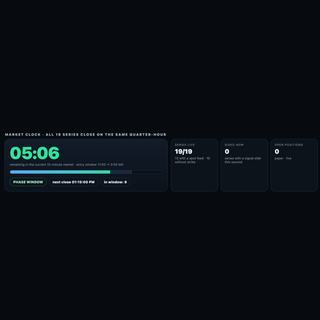
DeskBot
Desktop trading bot for Kalshi prediction markets: paper + live, risk rails, backtests. $1 first month, then $19.99/mo.
- Category
- Finance
- Rating
- Not yet rated
- Best for
- trading bot, Kalshi, prediction markets
Invoice Ninja
Free and open-source invoicing, quotes and payments software for freelancers and small businesses.
- Category
- Finance
- Rating
- Not yet rated
- Best for
- invoicing, freelance, open-source
| At a glance | DeskBot | Invoice Ninja |
|---|---|---|
| What it is | Desktop trading bot for Kalshi prediction markets: paper + live, risk rails, backtests. $1 first month, then $19.99/mo. | Free and open-source invoicing, quotes and payments software for freelancers and small businesses. |
| Category | Finance | Finance |
| Type | Software | Software |
| Best for | trading bot, Kalshi, prediction markets, finance | invoicing, freelance, open-source, payments |
What is DeskBot?
DeskBot is a desktop trading bot for Kalshi prediction markets, built for traders who want automation without giving up control. It runs natively on Mac (Universal build for Apple Silicon and Intel) and on Windows, so your strategies execute from your own computer rather than a shared cloud server.
Paper and live modes: Start in paper trading to watch how a strategy behaves against real market data with zero money at stake. When you are comfortable, switch to live trading using your own Kalshi account. The same strategy settings carry over, so the move from simulation to real orders is a deliberate, single step.
Secure API connection: DeskBot connects to Kalshi through the official API using your own API key credentials. You create the key in your Kalshi account and authorize DeskBot locally; you stay in charge of access and can revoke the key at any time from Kalshi.
Risk rails built in: Every strategy runs inside guardrails you set. Position sizing rules cap how much goes into any single trade, and bankroll protection automatically pauses trading when losses reach the limits you define. These rails are designed to keep one bad stretch from turning into a disaster and to keep the bot behaving the way you intended.
Backtests before you commit: Run backtests on historical market data to see how a strategy might have performed, compare settings, and spot weaknesses before risking capital. Backtests are a research tool, not a promise: past backtests overstate live results, because real fills, fees, liquidity, and timing are harder than history makes them look.
Simple pricing: Try DeskBot for $1 for the first month, then $19.99 per month.
Who it is for: Kalshi traders who want disciplined, rules-based automation, hobbyists who want to learn strategy design safely in paper mode, and active traders who want consistent execution with clear limits.
Get started at https://deskbot.store
Important disclosures: DeskBot is an independent product and is not affiliated with, endorsed by, or sponsored by Kalshi. Trading involves risk of loss, and you can lose money you put into the markets. Past backtests overstate live results, and no strategy is guaranteed to be profitable. Only trade with money you can afford to lose.
What is Invoice Ninja?
Invoice Ninja is free, open-source invoicing and billing software built for freelancers, consultants and small businesses that need to look professional and get paid faster. Trusted by more than 200,000 businesses and running since 2014, it bundles invoicing, online payments, quotes, time tracking and expense management into one platform you can use in the cloud or self-host on your own server.
What is Invoice Ninja?
Invoice Ninja lets you create polished, branded invoices in minutes and send them to clients who can pay directly from the invoice in a single click. Around that core it adds the surrounding workflow most small businesses juggle across several tools: quotes and proposals, recurring and auto-billing, a branded client portal, expense and vendor tracking, and project management with Kanban boards.
Who it's for
The platform is a natural fit for freelancers, contractors, designers, developers, consultants and accountants — anyone who bills clients and wants a dependable, low-cost way to manage the money side of the business. The generous free plan makes it especially attractive for solo operators and new businesses watching every expense.
Key features
- Professional invoicing with customizable templates
- One-click online payments from the invoice
- Recurring and automatic billing
- Quotes, proposals and e-signatures
- Time tracking and Kanban-style project management
- Expense and vendor management
- A branded client portal
- Bank and credit-card transaction import
- Multi-factor authentication and PCI-DSS compliance
Payments and integrations
Invoice Ninja accepts payments through a wide range of gateways including Stripe, PayPal, Square and GoCardless, so clients can pay however they prefer. It connects with more than 50 services — QuickBooks, Gmail, Slack, Mailchimp and hundreds more — via Zapier, Make and Pabbly, and its API and self-hosting options make it a favorite among technically minded users who want full control of their data.
Open source and self-hosting
Unlike most billing tools, Invoice Ninja is open source with a public GitHub repository, and it can be self-hosted for teams that want to own their infrastructure and data outright. That transparency is a large part of why developers and privacy-conscious businesses gravitate to it.
Pricing
The Free plan is genuinely free forever and covers the essentials for a small client list, with no credit card required. Paid tiers add more templates, clients and advanced features: Ninja Pro at around $14/month, Enterprise at around $18/month, and a Premium Business tier for larger operations. A 30-day money-back guarantee backs the paid plans.
Getting paid faster
The whole product is oriented around shortening the gap between sending an invoice and receiving the money. Auto-billing charges recurring clients on schedule, payment reminders chase overdue invoices for you, and the one-click pay experience removes the friction that makes clients delay. Because customers can pay by card, PayPal or direct debit straight from the invoice, there are fewer excuses and fewer late payments.
Security and reliability
Invoice Ninja takes the money side seriously, with multi-factor authentication to protect accounts and PCI-DSS compliance for card handling. Self-hosting adds another layer of assurance for businesses that would rather keep financial data entirely on their own infrastructure, and the open-source codebase means the security model is transparent and auditable rather than a black box.
Why choose Invoice Ninja
Invoice Ninja's pitch is simple: professional invoicing and full billing workflow without the subscription bloat. The combination of a real free tier, open-source transparency, self-hosting and one-click payments makes it one of the best-value ways for independent businesses to bill clients and get paid on time. For freelancers and small teams who resent paying a premium just to send an invoice, it is one of the strongest options on the market.
Key differences at a glance
- Purpose: DeskBot is Desktop trading bot for Kalshi prediction markets: paper + live, risk rails, backtests. $1 first month, then $19.99/mo. Invoice Ninja, by contrast, is Free and open-source invoicing, quotes and payments software for freelancers and small businesses.
- Category & type: both sit in Finance, and both are offered as software.
- Best suited for: DeskBot leans toward trading bot, Kalshi, prediction markets, whereas Invoice Ninja leans toward invoicing, freelance, open-source.
- Community rating: DeskBot is not yet rated vs Invoice Ninja is not yet rated. Ratings are community-submitted and change over time.
DeskBot vs Invoice Ninja: which should you choose?
DeskBot and Invoice Ninja both serve the finance space, so the best choice depends on your priorities. Choose DeskBot if you want Desktop trading bot for Kalshi prediction markets: paper + live, risk rails, backtests. $1 first month, then $19.99/mo. Choose Invoice Ninja if you want Free and open-source invoicing, quotes and payments software for freelancers and small businesses.The smartest move is to try each one's free tier or trial on a real task — that's the fastest way to feel the difference and pick the tool you'll actually stick with.
Frequently asked questions
Is DeskBot better than Invoice Ninja?
It depends on what you need. DeskBot is Desktop trading bot for Kalshi prediction markets: paper + live, risk rails, backtests. $1 first month, then $19.99/mo. Invoice Ninja is Free and open-source invoicing, quotes and payments software for freelancers and small businesses. Both are finance tools, so the right pick comes down to your specific priorities, budget and workflow.
What's the main difference between DeskBot and Invoice Ninja?
DeskBot focuses on Desktop trading bot for Kalshi prediction markets: paper + live, risk rails, backtests. $1 first month, then $19.99/mo. while Invoice Ninja focuses on Free and open-source invoicing, quotes and payments software for freelancers and small businesses. Read the full breakdown above and check each tool's site for current features and pricing.
Can I use both DeskBot and Invoice Ninja?
In many cases, yes — teams often use complementary tools together. Whether it makes sense depends on overlap in functionality and your budget. Try the free tier or trial of each to see how they fit your stack before committing.
Which is cheaper, DeskBot or Invoice Ninja?
Pricing changes often, so check each tool's pricing page for the latest. Many tools offer a free tier or trial, which is the best way to evaluate value for your specific usage before you pay.