DeskBot vs Lava MCP (熔岩): Which Is Better in 2026?
A side-by-side comparison of DeskBot and Lava MCP (熔岩), two finance tools — what each does, who it's best for, and how to choose between them.
Quick verdict
DeskBot and Lava MCP (熔岩) are both finance tools, so it comes down to fit. Pick DeskBot if you want Desktop trading bot for Kalshi prediction markets: paper + live, risk rails, backtests. $1 first month,… Pick Lava MCP (熔岩) if you want Real-time news-flow heat monitoring for China A-share stocks and concept sectors via API, MCP and Agent…
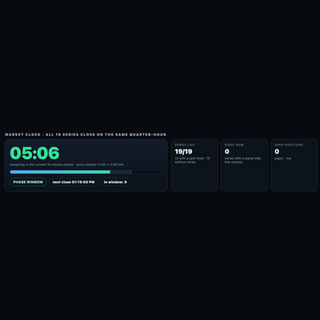
DeskBot
Desktop trading bot for Kalshi prediction markets: paper + live, risk rails, backtests. $1 first month, then $19.99/mo.
- Category
- Finance
- Rating
- Not yet rated
- Best for
- trading bot, Kalshi, prediction markets
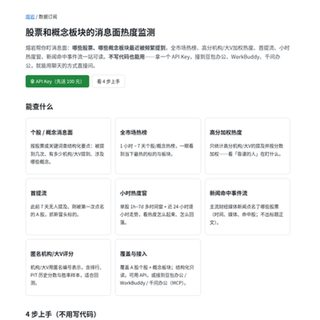
Lava MCP (熔岩)
Real-time news-flow heat monitoring for China A-share stocks and concept sectors via API, MCP and Agent Skill.
- Category
- Finance
- Rating
- Not yet rated
- Best for
- MCP, stock market, China A-shares
| At a glance | DeskBot | Lava MCP (熔岩) |
|---|---|---|
| What it is | Desktop trading bot for Kalshi prediction markets: paper + live, risk rails, backtests. $1 first month, then $19.99/mo. | Real-time news-flow heat monitoring for China A-share stocks and concept sectors via API, MCP and Agent Skill. |
| Category | Finance | Finance |
| Type | Software | Software |
| Best for | trading bot, Kalshi, prediction markets, finance | MCP, stock market, China A-shares, sentiment |
What is DeskBot?
DeskBot is a desktop trading bot for Kalshi prediction markets, built for traders who want automation without giving up control. It runs natively on Mac (Universal build for Apple Silicon and Intel) and on Windows, so your strategies execute from your own computer rather than a shared cloud server.
Paper and live modes: Start in paper trading to watch how a strategy behaves against real market data with zero money at stake. When you are comfortable, switch to live trading using your own Kalshi account. The same strategy settings carry over, so the move from simulation to real orders is a deliberate, single step.
Secure API connection: DeskBot connects to Kalshi through the official API using your own API key credentials. You create the key in your Kalshi account and authorize DeskBot locally; you stay in charge of access and can revoke the key at any time from Kalshi.
Risk rails built in: Every strategy runs inside guardrails you set. Position sizing rules cap how much goes into any single trade, and bankroll protection automatically pauses trading when losses reach the limits you define. These rails are designed to keep one bad stretch from turning into a disaster and to keep the bot behaving the way you intended.
Backtests before you commit: Run backtests on historical market data to see how a strategy might have performed, compare settings, and spot weaknesses before risking capital. Backtests are a research tool, not a promise: past backtests overstate live results, because real fills, fees, liquidity, and timing are harder than history makes them look.
Simple pricing: Try DeskBot for $1 for the first month, then $19.99 per month.
Who it is for: Kalshi traders who want disciplined, rules-based automation, hobbyists who want to learn strategy design safely in paper mode, and active traders who want consistent execution with clear limits.
Get started at https://deskbot.store
Important disclosures: DeskBot is an independent product and is not affiliated with, endorsed by, or sponsored by Kalshi. Trading involves risk of loss, and you can lose money you put into the markets. Past backtests overstate live results, and no strategy is guaranteed to be profitable. Only trade with money you can afford to lose.
What is Lava MCP (熔岩)?
Lava is a structured, read-only data subscription that tracks how hot individual China A-share stocks and concept sectors are in the news flow, based on commentary from institutions and market influencers. Each record gives the related concepts, tickers, a short summary of key points and an anonymous source ID, so quant traders and AI agents can spot rising themes early, rank sectors by attention, and feed the signal into screening, backtests or research workflows.
Connect in minutes: (1) subscribe and get an API key on the website; (2) call the REST API (OpenAPI spec provided) or add the MCP endpoint to Claude, Cursor, or any MCP client; (3) or install the ready-made Agent Skill. Typical uses: daily theme radar, sector heat ranking, stock attention alerts, and context for AI research assistants.
Endpoints: MCP https://lava.ai-dolphin.com/subscribe/v1/mcp ; OpenAPI https://lava.ai-dolphin.com/subscribe/v1/openapi.json ; Docs https://lava.ai-dolphin.com/subscribe/docs ; GitHub https://github.com/dustinliang666-blip/lava-mcp
中文简介:熔岩(Lava)是 A 股股票与概念板块的消息面热度监测数据订阅,提供概念、标的、要点摘要与匿名机构/大V ID,支持 REST API、MCP 与 Agent Skill 三种接入,适合量化研究与 AI Agent 调用。
What problem it solves
Spotting which A-share stocks and concept sectors are heating up in the news flow, in a structured form that quant tools and AI agents can consume.
Key differences at a glance
- Purpose: DeskBot is Desktop trading bot for Kalshi prediction markets: paper + live, risk rails, backtests. $1 first month, then $19.99/mo. Lava MCP (熔岩), by contrast, is Real-time news-flow heat monitoring for China A-share stocks and concept sectors via API, MCP and Agent Skill.
- Category & type: both sit in Finance, and both are offered as software.
- Best suited for: DeskBot leans toward trading bot, Kalshi, prediction markets, whereas Lava MCP (熔岩) leans toward MCP, stock market, China A-shares.
- Community rating: DeskBot is not yet rated vs Lava MCP (熔岩) is not yet rated. Ratings are community-submitted and change over time.
DeskBot vs Lava MCP (熔岩): which should you choose?
DeskBot and Lava MCP (熔岩) both serve the finance space, so the best choice depends on your priorities. Choose DeskBot if you want Desktop trading bot for Kalshi prediction markets: paper + live, risk rails, backtests. $1 first month, then $19.99/mo. Choose Lava MCP (熔岩) if you want Real-time news-flow heat monitoring for China A-share stocks and concept sectors via API, MCP and Agent Skill.The smartest move is to try each one's free tier or trial on a real task — that's the fastest way to feel the difference and pick the tool you'll actually stick with.
Frequently asked questions
Is DeskBot better than Lava MCP (熔岩)?
It depends on what you need. DeskBot is Desktop trading bot for Kalshi prediction markets: paper + live, risk rails, backtests. $1 first month, then $19.99/mo. Lava MCP (熔岩) is Real-time news-flow heat monitoring for China A-share stocks and concept sectors via API, MCP and Agent Skill. Both are finance tools, so the right pick comes down to your specific priorities, budget and workflow.
What's the main difference between DeskBot and Lava MCP (熔岩)?
DeskBot focuses on Desktop trading bot for Kalshi prediction markets: paper + live, risk rails, backtests. $1 first month, then $19.99/mo. while Lava MCP (熔岩) focuses on Real-time news-flow heat monitoring for China A-share stocks and concept sectors via API, MCP and Agent Skill. Read the full breakdown above and check each tool's site for current features and pricing.
Can I use both DeskBot and Lava MCP (熔岩)?
In many cases, yes — teams often use complementary tools together. Whether it makes sense depends on overlap in functionality and your budget. Try the free tier or trial of each to see how they fit your stack before committing.
Which is cheaper, DeskBot or Lava MCP (熔岩)?
Pricing changes often, so check each tool's pricing page for the latest. Many tools offer a free tier or trial, which is the best way to evaluate value for your specific usage before you pay.