What Can Your ISP See? How a VPN Protects Your Online Privacy
Every time you connect to the internet, your Internet Service Provider sits at a critical point between your device and the wider web. Whether you are browsing from home, using mobile data, streaming video, checking email, or connecting to an online service, your traffic normally passes through infrastructure operated by your ISP.
Modern encryption has significantly improved online privacy. HTTPS now protects the contents of most web traffic, which means an ISP generally cannot simply read everything you type into a website or see the exact contents of an encrypted page.
But that does not mean your internet activity is invisible.
Understanding what an ISP can and cannot see is important for anyone concerned about online privacy. It also helps explain what a VPN actually protects, what it does not protect, and why encryption alone does not eliminate every form of network-level visibility.
What can your ISP see without a VPN?
When you connect directly to the internet, your ISP is responsible for routing your traffic. As a result, it inevitably has access to certain information about your connection.
Depending on the protocol, application, DNS configuration and encryption being used, this may include:
Your public IP address
The IP addresses of servers you connect to
Connection timestamps
The duration of network connections
The amount of data transferred
Unencrypted DNS requests in configurations that still use traditional DNS
Unencrypted traffic from applications or services that do not use secure protocols
The important distinction is between content and metadata.
HTTPS can protect the contents of a connection while still leaving useful network metadata observable.
For example, imagine visiting a website over HTTPS. Your ISP should not be able to read the password you enter into an encrypted login form or the private messages transmitted inside that encrypted HTTPS connection.
However, network information may still reveal which infrastructure your device is communicating with, when the communication occurred and how much traffic was exchanged.
That distinction is one of the most frequently misunderstood aspects of internet privacy.
HTTPS protects content, but it is not a complete privacy solution
HTTPS is one of the most important security technologies on the modern internet.
When a website uses HTTPS correctly, the communication between your browser and the website is encrypted. Someone observing the connection at the network level cannot simply inspect the encrypted packets and reconstruct the page you are reading.
This protects sensitive information such as:
Passwords
Payment information
Private messages
Form submissions
Page contents
Authentication cookies
But HTTPS was not designed to hide every aspect of your network activity from your ISP.
Your ISP still provides the network path required to reach the destination. Depending on the technologies involved, information outside the encrypted application payload can remain observable.
This is why "the website uses HTTPS" and "my ISP cannot see anything about what I am doing" are not equivalent statements.
DNS can reveal more than many users realize
DNS is another important part of the privacy equation.
Before connecting to many internet services, a device needs to translate a domain name into an IP address. Traditionally, this lookup has been performed using unencrypted DNS.
If your DNS queries are sent in plaintext to a resolver operated by your ISP, the ISP can directly observe the domain names being requested.
Encrypted DNS technologies such as DNS over HTTPS and DNS over TLS can reduce this exposure by encrypting DNS requests between the device and the selected DNS resolver.
However, encrypted DNS should not be confused with a VPN.
It protects DNS resolution. It does not create an encrypted tunnel for all of the device's internet traffic.
That distinction matters.
What changes when you connect through a VPN?
A VPN changes the network path.
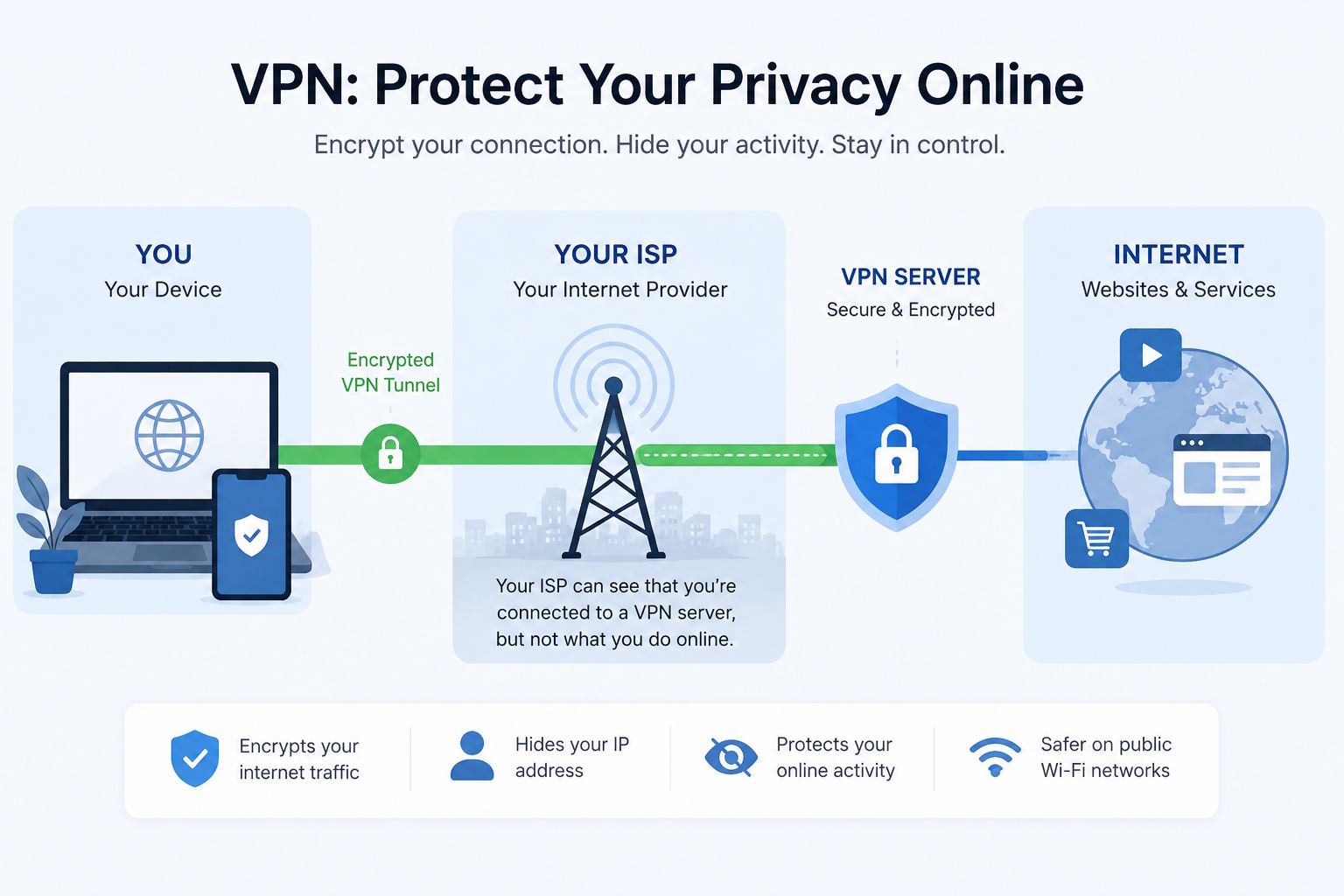
Instead of connecting directly from your device to internet destinations, your device establishes an encrypted tunnel to a VPN server. Internet traffic is then routed through that server.
From the ISP's perspective, the most obvious network relationship becomes:
Your device -> VPN server
rather than a series of direct connections from your device to many different internet services.
A properly configured VPN therefore significantly changes what an ISP can observe about your browsing activity.
The ISP can generally still determine that your connection is communicating with the VPN server. It can also observe information such as connection timing and the amount of encrypted data transferred.
What it should no longer be able to inspect through that encrypted tunnel is the underlying traffic in the same way it could when the device was communicating directly with destinations.
This is the core privacy function of a VPN.
What your ISP can still see when you use a VPN
A VPN does not make a user invisible.
When connected to a VPN, the ISP can generally still observe information such as:
Your connection to the ISP itself
The IP address of the VPN server
When the VPN connection begins and ends
The approximate volume of encrypted traffic
Network characteristics that may indicate VPN usage
This is important because responsible privacy technology should not be marketed as magic.
A VPN changes who can observe particular parts of the network path. It does not eliminate the network path.
The ISP still transports packets between your device and the VPN server. What changes is that the contents carried inside the VPN tunnel are encrypted.
What websites see when you use a VPN
There is another side to the connection.
Without a VPN, websites and online services normally see the public IP address assigned to your connection.
With a VPN, the destination generally sees the public IP address of the VPN server instead.
This can provide several privacy benefits.
It prevents websites from trivially associating every connection with your normal public IP address and allows traffic to originate from the VPN server's network location.
However, an IP address is only one method of identifying or correlating users online.
Websites may still use:
Cookies
Account logins
Browser fingerprinting
Tracking scripts
Advertising identifiers
Previously stored browser data
A VPN therefore complements browser privacy controls rather than replacing them.
If you sign into the same personal account while connected to a VPN, the service obviously still knows which account is being used.
Public Wi-Fi is another important use case
Coffee shops, hotels, airports, universities and other public networks are convenient, but they are networks that users usually do not control.
Modern HTTPS has made public Wi-Fi considerably safer than it was in the era when large amounts of web traffic were transmitted without encryption.
Nevertheless, routing traffic through an encrypted VPN tunnel adds another layer of protection between the device and the VPN server.
This can be especially useful when the user does not trust the local network operator or does not know how the network is configured.
The objective is not to assume that every public Wi-Fi network is malicious. It is to reduce how much trust must be placed in an unknown network.
VPN protocols matter
"VPN" describes a type of service, but the underlying tunnel can be implemented using different protocols.
Common examples include WireGuard, OpenVPN and IKEv2.
WireGuard has become popular because of its relatively small codebase, modern cryptographic design and strong performance characteristics.
OpenVPN remains widely supported and configurable, with a long history of deployment across different operating systems and network environments.
IKEv2 is particularly useful on devices that support it natively and can perform well when a device changes networks, such as moving between Wi-Fi and mobile connectivity.
Other technologies can address environments where conventional VPN traffic is restricted or subject to network filtering.
A privacy service does not necessarily need to force every user into a single protocol. Different networks, operating systems and threat models can benefit from different connection methods.
Encryption is only part of the trust model
There is an important privacy trade-off when using any VPN. Without a VPN, the ISP occupies a privileged position in the network path. With a VPN, encrypted traffic is routed through infrastructure operated by the VPN provider. This means choosing a VPN provider is fundamentally a question of trust.
Users should therefore look beyond slogans and consider factors such as:
Logging practices
Supported VPN protocols
DNS handling
Company transparency
Server infrastructure
Payment options
Security practices
Clear privacy policies
A VPN provider that collects unnecessary activity data can undermine the privacy benefits users expect from the technology.
For that reason, privacy-focused services should minimize unnecessary collection rather than simply relying on strong encryption.
One example is K1VPN, a privacy-focused VPN service supporting WireGuard, OpenVPN, IKEv2 and VLESS, designed around secure connectivity and a no-logs approach.
The broader principle, however, applies regardless of which provider a user chooses: understand where trust is being placed and what information that provider can access.
A VPN is not the same as anonymity
This distinction is essential.
Privacy and anonymity overlap, but they are not identical.
A VPN can:
Encrypt traffic between your device and the VPN server
Reduce the browsing information visible to your ISP
Replace your normal public IP address from the perspective of destination websites
Add protection when using networks you do not trust
A VPN cannot automatically:
Make you anonymous while logged into identifiable accounts
Remove tracking cookies already stored in your browser
Prevent every form of browser fingerprinting
Protect you from phishing
Remove malware from your device
Guarantee that websites cannot identify you through information you voluntarily provide
Good privacy therefore depends on layers.
A VPN can be an important layer, but it works best alongside HTTPS, secure DNS handling, updated software, sensible browser privacy settings, strong authentication and careful online behavior.
The practical privacy difference
Consider two simplified scenarios.
Without a VPN:
Device -> ISP -> Website
The ISP routes connections directly toward the services the device accesses.
With a VPN:
Device -> ISP -> Encrypted VPN tunnel -> VPN server -> Website
The ISP can observe the connection to the VPN infrastructure, but the underlying internet traffic is carried through the encrypted tunnel.
Meanwhile, the destination website receives the connection from the VPN server rather than directly from the user's normal public IP address. This does not produce perfect anonymity. It does, however, meaningfully alter the amount and type of information exposed at different points along the network path.
Final thoughts
Internet privacy is not a binary condition where a user is either completely visible or completely anonymous.
It is about reducing unnecessary exposure and understanding which parties can observe different pieces of information.
HTTPS protects the contents of web connections. Encrypted DNS can protect DNS queries from local network observation. Browser privacy controls can reduce tracking. A VPN adds another important layer by encrypting traffic between the device and the VPN server and changing the network path visible to the ISP.
For users concerned about ISP visibility, public Wi-Fi, exposure of their normal public IP address or network-level privacy, a VPN can therefore be a useful part of a broader privacy strategy.
The key is understanding what the technology actually does.
A VPN should not be treated as an invisibility switch. It should be understood as an encrypted network layer that reduces what intermediaries on the local connection can observe and shifts trust from the ISP toward the VPN provider.
That makes transparency, technical implementation and responsible data handling just as important as encryption itself.