How to Create Professional Quotes Faster: A Practical Guide for Service Businesses
How to Create Professional Quotes Faster: A Practical Guide for Service Businesses
Creating estimates and quotes is an essential part of running a service business. Whether you work independently, run a small company or manage a larger service operation, customers need a clear explanation of the work, services or materials being proposed and how much they will cost.
For many businesses, preparing a quote still means opening a spreadsheet, copying an old document, checking a separate price list and manually creating a PDF before sending it to the customer. This process can work for occasional quotes, but it becomes time-consuming when estimates are prepared regularly.
A structured quoting process can make estimates faster to prepare, easier to review and more professional for the customer.
What is the difference between an estimate and a quote?
An estimate is generally an indication of what a job or service is expected to cost. It may be prepared before all details of a project are finalized and can sometimes change as more information becomes available.
A quote is usually more specific. It presents the proposed services, materials and pricing that a customer can review before deciding whether to proceed.
In everyday business, the terms estimate, quotation and quote are often used interchangeably. What matters most is having a clear process for preparing the pricing information and presenting it to the customer.
What should a professional quote include?
A professional quote should give the customer enough information to understand what is being offered and how the final price was calculated.
Depending on the type of business, a quote can include:
Customer information
Business information and branding
Services or materials
Quantities
Individual prices
Taxes
Discounts
Total price
Additional notes or details
A clear way for the customer to respond
The exact content depends on the job, but the principle is the same: the customer should be able to understand the proposal without having to ask the business to explain every part of it.
1. Keep your service prices organized
One of the easiest ways to speed up quoting is to maintain a reusable price list.
Service businesses often provide the same services repeatedly. Instead of entering the service name and price manually every time a new estimate is created, commonly used services can be stored and reused.
For example, a business may have standard labor rates, recurring services, common materials or predefined packages. Keeping these items together makes it easier to find the correct pricing when preparing a new estimate.
A centralized price list can also make pricing more consistent across different quotes.
2. Use predefined services when creating estimates
Once commonly used services are organized, they should be easy to add to a new estimate.
A good estimating workflow allows a business to select services from its existing price list and then adjust the details for the particular customer or job.
At the same time, not every project will fit a predefined list. A customer may request additional work, a special material or a one-time service.
That is why custom line items are important. The business should be able to combine predefined services with manually added items instead of having to modify the entire price list whenever something unusual appears in a project.
This combination makes the process both faster and flexible enough for individual jobs.
3. Manage quantities, pricing, taxes and discounts
A quote may contain many individual items, especially when a project involves several services or materials.
Entering these calculations manually into every document creates unnecessary work and increases the possibility of mistakes. An estimating system can help organize quantities, prices and taxes while calculating the resulting totals.
Discounts can also be handled as part of the quoting process. Instead of manually changing several individual prices, a business can apply a discount where appropriate.
For example, a discount may apply to one item, an entire section or the complete quote.
Keeping these calculations inside the estimate makes it easier to review the final price before the quote is sent to the customer.
4. Create a professional PDF quote
Once the estimate is ready, it needs to be presented to the customer.
A professional PDF quote remains a practical format for many businesses. It can be saved, shared, printed and kept for future reference.
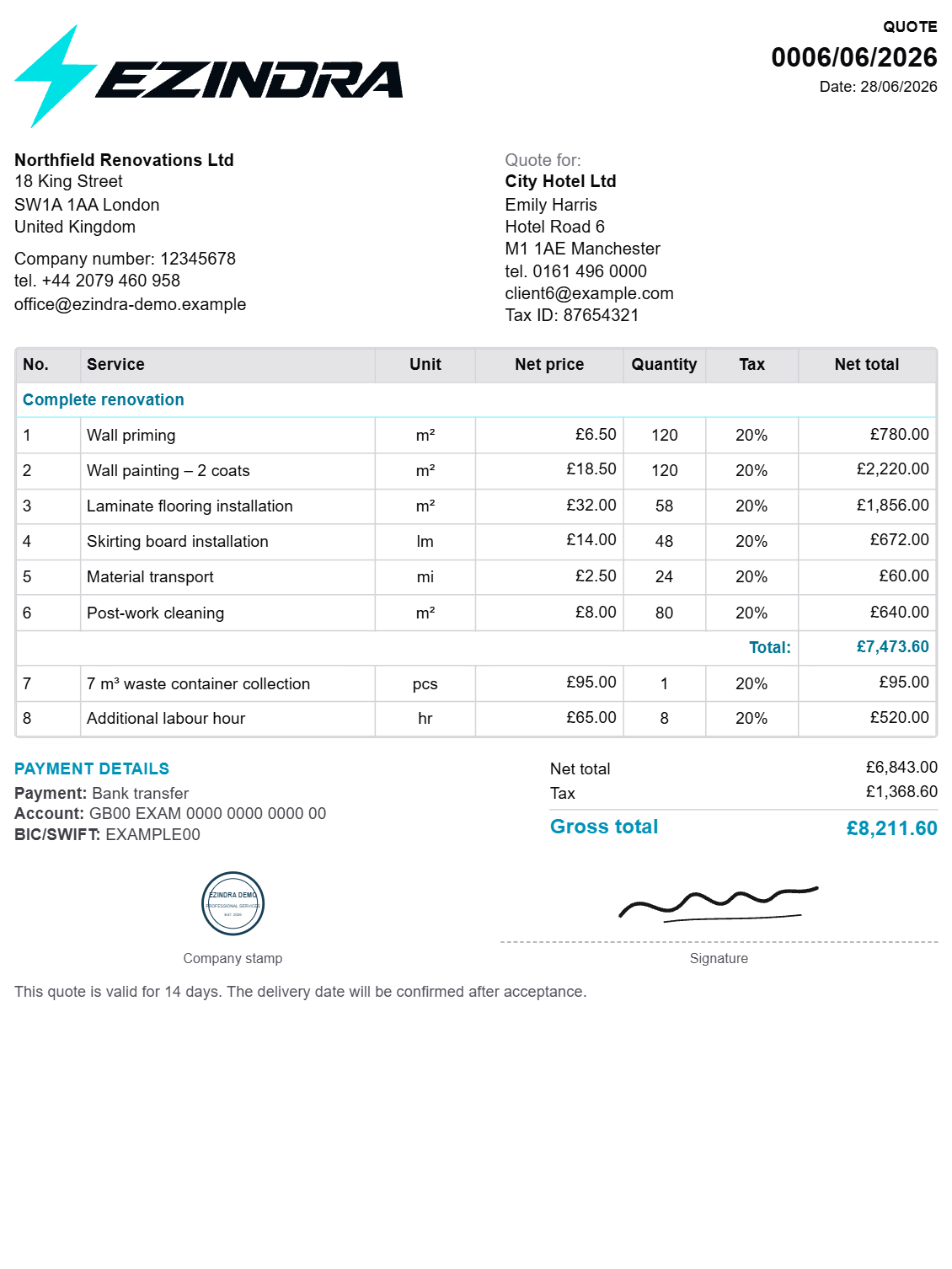
The document should clearly present the business information, customer information, proposed work and pricing.
Branding is also important. Adding the company's logo, stamp or signature can turn a generic document into a professional business quote that is consistent with the company's other communications.
Generating the PDF directly from the estimate also avoids having to copy information between different documents.
5. Send the quote through an online link
Sending a PDF attachment by email is still common, but an online quote can make the process more convenient.
Instead of relying exclusively on an attachment, a business can send the customer a secure link to the quote. The customer can then open the quote and review the proposed work and pricing.
This creates a more structured process and avoids some of the problems associated with searching through email conversations for previously sent documents.
For businesses that prepare estimates frequently, having one consistent method for delivering quotes can save time and make the customer experience more professional.
6. Know when the customer opens the quote
One of the biggest challenges after sending a quote is not knowing what happened next.
A business may send a proposal and receive no immediate response. Without any additional information, it can be difficult to know whether the customer has not seen it yet or is simply considering the offer.
Quote activity notifications can provide useful context.
EZINDRA notifies the service provider when a client opens a quote. It also provides notifications when the client accepts or rejects the quote.
This gives the business a clearer indication of what happened after the quote was delivered and can help determine when a follow-up may be appropriate.
7. Make accepting or rejecting the quote straightforward
The customer should not have to send several emails simply to confirm a decision.
With an online quote workflow, the customer can review the proposal and accept or reject it directly.
This makes the next step clear for both sides.
For the business, the response is connected to the quote itself rather than being buried in an unrelated email conversation. This can make it easier to keep track of which estimates are still awaiting a decision and which have already received a response.
8. Keep customer information connected to estimates
Quoting is closely connected to customer management.
Businesses often need access to customer names, contact details and other information when preparing a new estimate. Keeping these records separate from the quoting process can mean repeatedly searching through spreadsheets, email conversations or other systems.
A centralized customer database can make this process more efficient.
EZINDRA connects customer records with the quoting workflow. Businesses can access customer information when preparing estimates and can use actions such as calling or emailing a customer or opening directions to the customer's location.
This keeps common customer actions close to the information needed to prepare and manage quotes.
9. Build a repeatable quoting workflow
The biggest improvement usually comes from creating a repeatable process rather than relying on individual documents.
A typical workflow can look like this:
Customer → Estimate → Services and materials → Pricing → Taxes and discounts → Professional PDF → Online quote → Client opens → Accepts or rejects → Follow-up
Once this workflow is established, a business no longer needs to recreate the entire quoting process for every customer.
Reusable services, customer records and quote templates can reduce repetitive work while custom line items provide flexibility for jobs that are different from the usual ones.
What should you look for in quoting software?
There are many types of business software that can help with estimates and customer management. Some are broad field-service platforms with scheduling, dispatching, invoicing and many other features.
For a business primarily looking to improve its quoting workflow, it is useful to evaluate the specific tasks involved in preparing and managing estimates.
Consider whether the software allows you to:
Store customer information
Maintain a service price list
Reuse commonly used services
Create estimates quickly
Add custom line items
Manage quantities and prices
Apply taxes and discounts
Create professional PDF quotes
Add business branding
Send quotes through an online link
Let customers accept or reject quotes
Know when a customer opens a quote
Receive notifications about customer responses
Keep track of quote activity
The right solution depends on the business. Some companies need a comprehensive field-service management platform, while others primarily need an organized way to create estimates, send professional quotes and manage customer responses.
What are the alternatives to quoting software?
Businesses do not necessarily need dedicated estimating software to create quotes.
Many start with tools they already have, such as Excel, Google Sheets, Word, PDF templates or email. These options can work for a small number of estimates.
The problem is that information can become scattered as the business grows. Customer details may be stored in one place, service prices in another and previous quotes somewhere else.
Manual documents also do not provide the same workflow for online quote delivery and tracking customer responses.
Dedicated quoting software brings these individual steps together and can reduce the amount of repetitive administrative work involved in preparing estimates.
How EZINDRA helps with the quoting process
EZINDRA is a quoting and client management platform designed for professionals and service businesses that regularly prepare estimates and quotes for their work, services or materials.
It brings customers, service pricing, estimates and quotes into one workflow.
Businesses can maintain their own service price list, use predefined services when creating estimates and add custom line items whenever a job requires something outside the standard list. Estimates can include quantities, prices, taxes and discounts.
Once an estimate is ready, EZINDRA can generate a professional PDF quote with the business's own logo, stamp and signature.
The quote can then be shared with the customer through a secure online link. Customers can review the proposal and accept or reject it online.
EZINDRA also provides notifications when a customer opens a quote and when the customer accepts or rejects it. This gives the business useful information about what happens after a quote has been sent.
Customer management is part of the same workflow. Customer records can be used when preparing estimates and provide convenient actions for calling or emailing customers and opening directions to their location.
The result is a structured quoting process that connects the initial customer record and pricing information with the estimate, professional quote and final customer response.
A better quoting process starts with organization
Creating professional quotes does not have to mean creating every document from scratch.
A well-organized process starts with keeping customer information and service prices accessible, continues with a consistent estimating workflow and ends with a professional quote that is easy for the customer to review and respond to.
For businesses that prepare estimates regularly, even small improvements can remove repetitive administrative work.
Instead of switching between spreadsheets, documents, email and separate customer records, a dedicated quoting workflow can bring these steps together.
EZINDRA is built around that process: organize customers and services, create the estimate, prepare a professional quote, send it online and keep track of the customer's response.