SaaS vs PaaS vs IaaS: What Is The Difference?
SaaS vs PaaS vs IaaS Explained
Cloud computing has changed the way companies build, use, and manage technology.
Instead of buying expensive servers, installing software, and maintaining complex systems, businesses can now use cloud-based services.
The three most common cloud service models are:
SaaS (Software as a Service)
PaaS (Platform as a Service)
IaaS (Infrastructure as a Service)
Although these terms sound similar, they serve different purposes.
In simple words:
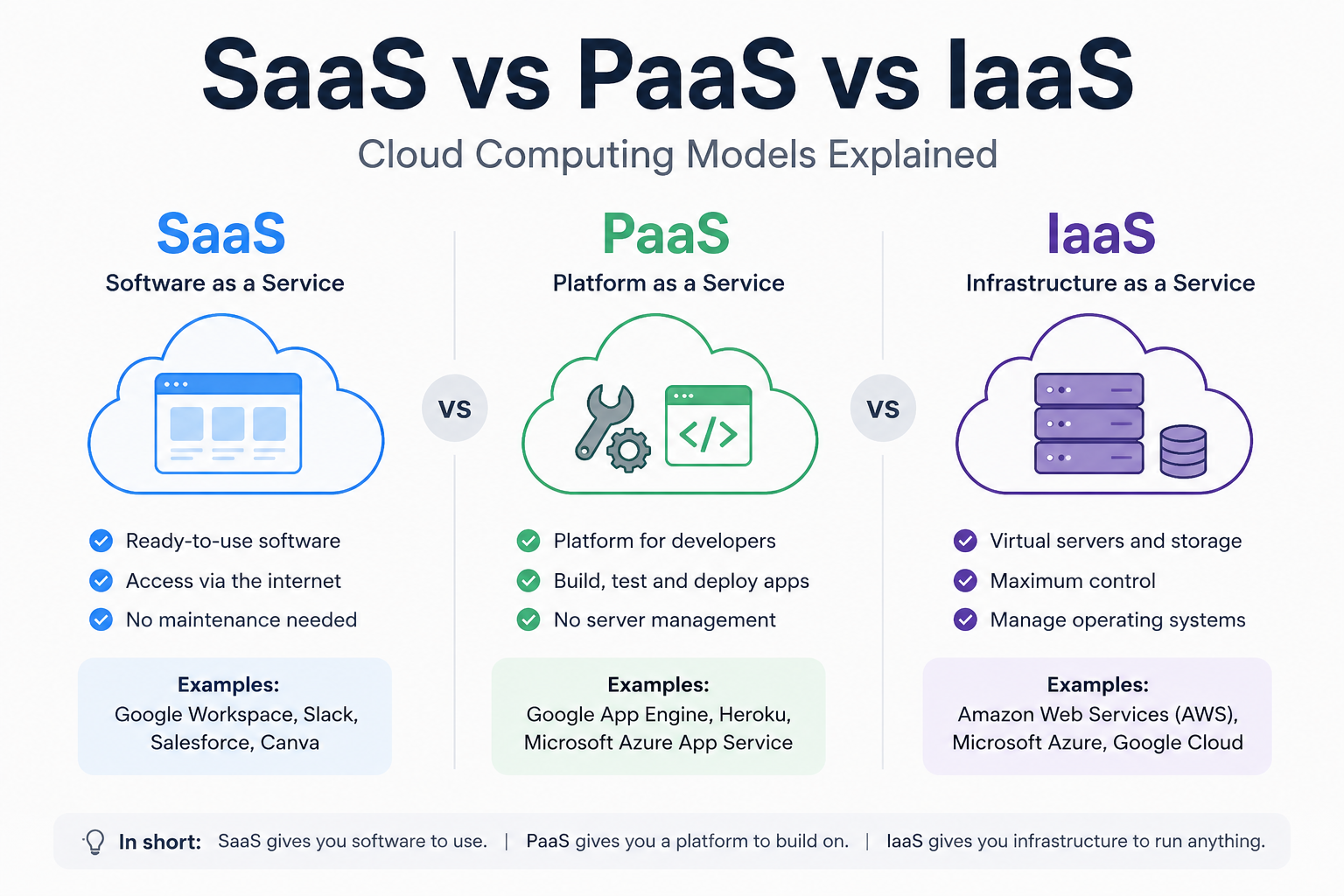
SaaS gives you ready-to-use software.
PaaS gives developers tools to build software.
IaaS gives companies the infrastructure to run software.
What Is SaaS (Software as a Service)?
SaaS stands for Software as a Service.
It is the most user-friendly cloud model because customers simply use the software without worrying about servers, updates, or technical maintenance.
The provider manages everything behind the scenes.
Users usually access SaaS products through a browser or mobile application.
SaaS Examples
Popular SaaS products include:
Google Workspace
Microsoft 365
Salesforce
Slack
Canva
Notion
For example, when you use Gmail or Google Docs, you are using SaaS.
You do not install the software manually. You simply log in and start working.
Benefits of SaaS
Easy to Use
Most SaaS products are designed for regular users and require little technical knowledge.
Lower Costs
Companies avoid buying expensive hardware and paying for infrastructure.
Automatic Updates
The SaaS provider handles security updates and new features.
Available Anywhere
Users can access SaaS applications from different devices and locations.
What Is PaaS (Platform as a Service)?
PaaS stands for Platform as a Service.
PaaS provides developers with an environment where they can create, test, and deploy applications.
Instead of managing servers and infrastructure, developers focus on writing code.
The platform handles things like:
Servers
Databases
Operating systems
Development tools
PaaS Examples
Popular PaaS platforms include:
Google App Engine
Microsoft Azure App Service
Heroku
Vercel
For example, a developer building a web application can use PaaS to deploy their project without manually configuring servers.
Benefits of PaaS
Faster Development
Developers can build applications faster because infrastructure is already prepared.
Less Maintenance
The cloud provider manages the technical foundation.
Easy Scaling
Applications can grow without manually upgrading servers.
Better Collaboration
Development teams can work together using shared tools and environments.
What Is IaaS (Infrastructure as a Service)?
IaaS stands for Infrastructure as a Service.
It provides virtualized computing resources over the internet.
Instead of buying physical servers, companies rent computing power when they need it.
IaaS gives more control than SaaS or PaaS.
Companies can manage:
Virtual machines
Storage
Networks
Operating systems
IaaS Examples
Popular IaaS providers include:
Amazon Web Services (AWS)
Microsoft Azure
Google Cloud Platform
Large companies often use IaaS because they need flexibility and full control over their infrastructure.
SaaS vs PaaS vs IaaS Comparison
FeatureSaaSPaaSIaaSFull softwareYesNoNoDevelopment toolsNoYesNoServersManagedManagedProvidedUser controlLowMediumHighMain usersCustomersDevelopersIT teamsExampleGmailVercelAWS
SaaS vs PaaS vs IaaS: Simple Analogy
Imagine building a house.
SaaS
You rent a finished house.
Everything is ready.
You just use it.
PaaS
You get an empty house with tools included.
You design and build inside it.
IaaS
You get land, electricity, and basic resources.
You build everything yourself.
Which Cloud Model Should You Choose?
It depends on your needs.
Choose SaaS if:
You need software immediately
You do not want technical maintenance
You are a regular user or business
Choose PaaS if:
You are a developer
You want to build applications faster
You do not want to manage servers
Choose IaaS if:
You need maximum control
You manage complex systems
You have technical expertise
The Future of Cloud Computing
Cloud computing continues to grow because businesses want flexibility, speed, and lower costs.
Many modern companies combine all three models:
SaaS for everyday business tools
PaaS for development
IaaS for infrastructure
Together, these technologies power many of the world's biggest digital products.
Frequently Asked Questions
Is SaaS better than PaaS or IaaS?
Not necessarily. Each model solves a different problem.
SaaS is best for users, PaaS for developers, and IaaS for infrastructure management.
Is Netflix SaaS?
Netflix is a SaaS-like service because users access software through the internet without installing it.
Is AWS SaaS or IaaS?
AWS is mainly an IaaS provider because it offers cloud infrastructure such as servers and storage.
Is WordPress SaaS?
WordPress can be SaaS when used through hosted platforms, while the downloadable version works differently.
SEO Keywords:
SaaS vs PaaS vs IaaS, cloud computing models, SaaS meaning, PaaS meaning, IaaS meaning, cloud services explained