Text Differ
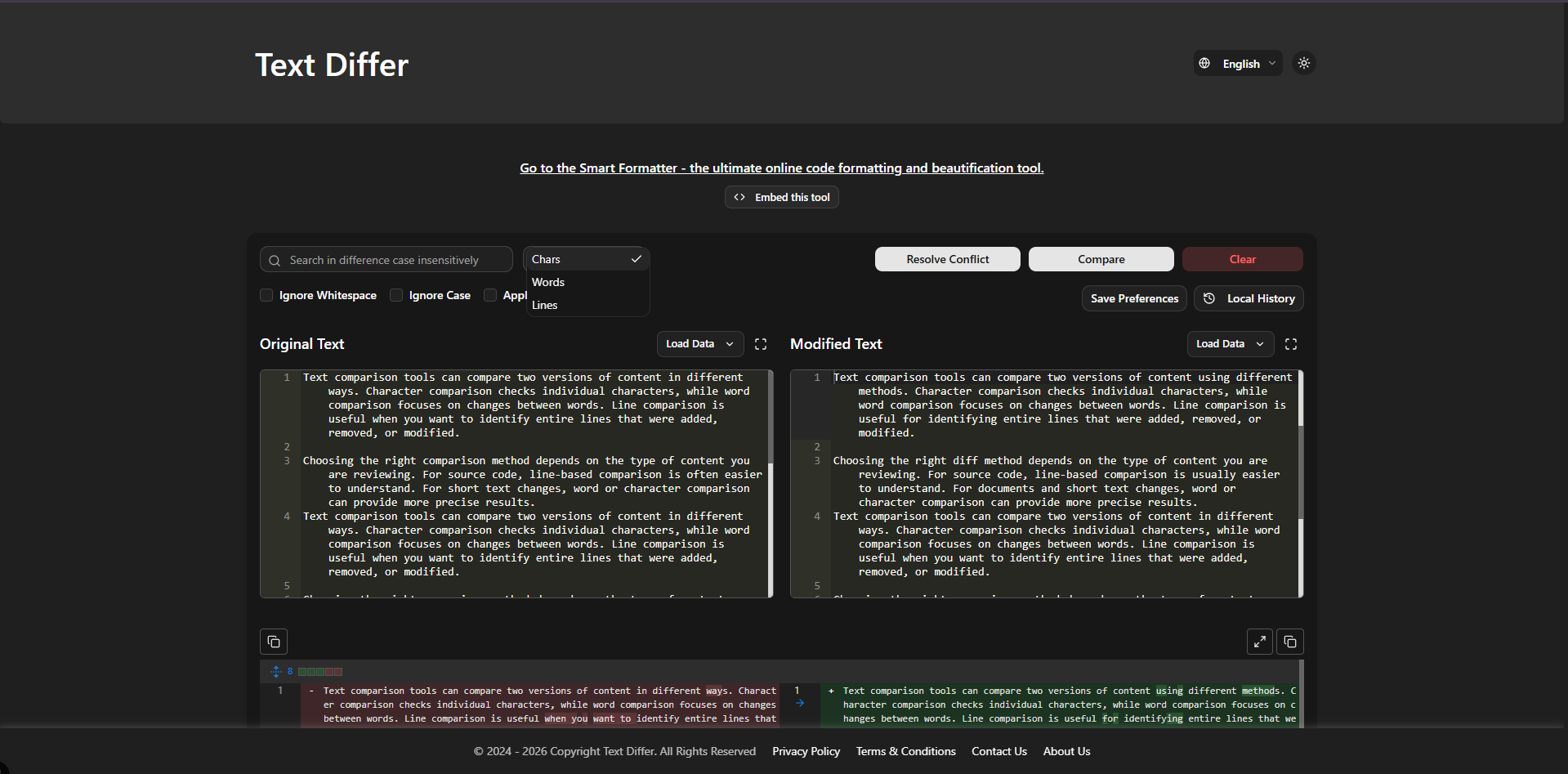
SoftwareFree online tool to compare difference between two texts. Instantly check text similarity and changes line by line, word by word and char by char.
About Text Differ
Free online tool to compare difference between two texts. Instantly check text similarity and changes line by line, word by word and char by char.
What problem it solves
Text Differ solves the tedious problem of manually comparing two versions of text, code, or documents. It lets users paste or load two versions and instantly see added, removed, and modified content side-by-side. It supports paragraph, word, and character-level comparisons, plus options to ignore whitespace/case and a 3-way merge
Alternatives & competitors
Alternatives to Diffchecker, Draftable, WinMerge, Text-Compare, Beyond Compare, Meld, and KDiff3.
Built with
Languages
Frameworks
Tags
Ratings & reviews
4.5
4 ratings
4 reviews
raghu nandanVerified
Aug 27, 2026
Amazing Tool for text compare and code formattion!
vraj lalVerified
Sep 9, 2026
A simple and highly useful tool for comparing two versions of text, code, or documents. It clearly highlights differences and offers helpful options like word, character, and line-level comparison, along with whitespace and case ignoring. I especially like how fast and easy it is to use—no complicated setup or unnecessary features. It’s great for developers, writers, editors, and anyone who needs to quickly spot changes. A few more advanced file-handling and customization options could make it even better, but overall it’s a reliable, practical, and easy-to-recommend text comparison tool.
pratap lalVerified
Sep 9, 2026
Tolodora’s Online Text Comparison Tool is an excellent choice for quickly comparing two versions of text, code, or documents. The interface is clean and straightforward, so you can paste your content and immediately see what has changed without dealing with unnecessary complexity. One of its strongest features is the ability to compare text at different levels, including line, word, and character level. This makes it useful for everything from checking small writing edits to reviewing source-code changes. Options such as ignoring whitespace and case are also helpful when you want to focus only on meaningful differences. The tool is particularly useful for developers, writers, editors, students, and content teams. The three-way merge functionality is another nice addition for comparing multiple versions and identifying changes. Overall, it is fast, practical, and easy to use. I would recommend it to anyone who needs a reliable online diff tool. A few improvements in advanced file sup
ApplyForMeVerified
Sep 10, 2026
Text Differ is a focused utility for comparing two versions of text and spotting changes line by line. The simple scope is a strength, especially for anyone who needs a quick browser-based comparison without a larger document workflow.
Similar softwares

Nitroindexer
Bulk URL indexing and Google index checks for SEO professionals.
Vectoree
Give your coding agent a backend — models, auth, database and storage in one cloud.

Embarko
Paste one prompt into Claude Code, Cursor or Codex and your agent deploys the app to a live HTTPS URL. No signup before your first deploy.
Compare Text Differ
Similar software
YOOR Free Tools
479 Free browser tools with no account required. Everything is processed locally: your files never leave your computer.
WeChat to Markdown (wx2md)
Save WeChat articles as local Markdown — no upload. Free Chrome extension for private, durable notes.
ConvertAny
Free online file, unit, text, app icon and developer conversion tools. No signup required.
aiFetchly
Local-first desktop AI agent with MCP tools and PreToolUse permission hooks for marketing ops

LaunchNest LN
LaunchNest LN is a product launch platform for SaaS, AI tools, and developer products. Discover new products, launch your own, and grow with a global community.

Pieces
An AI assistant for developers that remembers your context — capture snippets, recall what you did, and stay in flow.
Related reads

Text Differ: A Simple and Powerful Online Text Comparison Tool
Compare two versions of text, code, or documents instantly with Text Differ. Discover its key features, comparison modes, and practical uses.

The 5 Best Open-Source Authentication Tools in 2026
Open-source auth lets you own your users' data and avoid per-user pricing. Here are the five best self-hostable authentication tools in 2026, compared.

The 6 Best Vector Databases in 2026 (for RAG & AI Search)
Vector databases power RAG, semantic search and AI memory. Here are the six best in 2026 — from managed Pinecone to open-source Qdrant, Weaviate and Chroma — with who each is for.
Community discussion (0)
Ask questions, share tips, or compare notes with other Text Differ users.