
openmaker.si
SoftwareNewFree to create stunning AI images and videos with Open Maker AI. Turn text and reference images into visual content, edit photos, and explore image and video mo
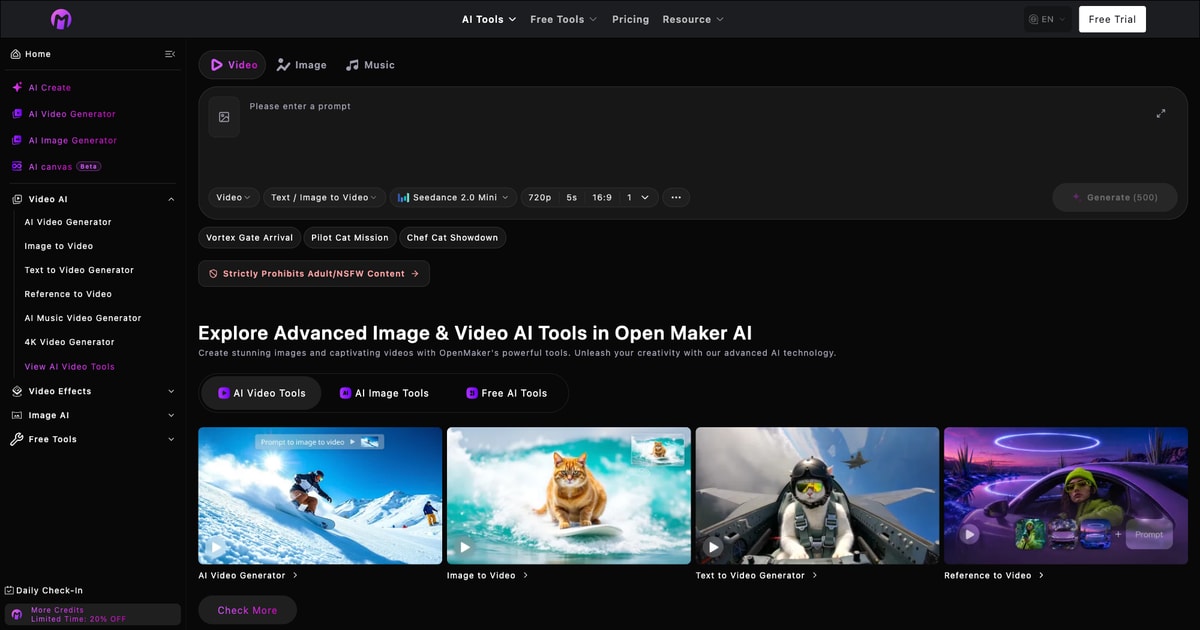
About openmaker.si
Open Maker AI is a browser-based tool for creating videos from text prompts and reference images, and for generating and editing images. It gives independent creators, small shops, and marketing teams a way to try a visual idea before deciding how to produce the finished piece. A shop owner might use it to mock up a close-up of a handmade product for a social post. A creator might use it to see how a still illustration could move in a short opening shot.
The free image-to-video tool lets you upload a first frame and a last frame, describe what should happen between them, and choose a format for where the clip will appear. The free form lists five-second clips at 480p and works without signup. Try starting with two pictures of the same object taken from slightly different angles. For example, one photo might show a ceramic cup from the front and the other might reveal the handle. A short prompt can describe a gentle camera move and ask to keep the cup, background, and lighting consistent.
If you are starting with an idea and no images, Open Maker AI also offers text-to-video. Describe the subject, the action, and the framing to start exploring a shot. If you are preparing reference images, the site offers tools for tasks such as removing a background or upscaling an image. More advanced generation options are available through credit-based tools.
A practical way to get started is to test one shot with one purpose. Before generating, decide what the viewer should notice. After generating, watch the full clip at the size you plan to share it. Check whether the intended detail stays clear. For a clip that will go into a longer video, save the download and open it in your usual editor before making more shots. If you need exact product names, prices, or event details on screen, add those as editable text during the final edit.
Open Maker AI works well as a place to explore a motion idea, compare two directions, or prepare a short piece of footage for an existing project. The free workflow gives you a concrete first clip to evaluate with your own materials.
What problem it solves
Creators and small shops often have product photos but no video footage. Open Maker AI lets them turn two still images and a short prompt into a five-second clip, so they can preview a product reveal, a camera move, or a social post idea before spending time filming or editing. The free image-to-video tool requires no signup and produces 480p clips.
Alternatives & competitors
Runway, Pika, Luma Dream Machine
Tags
openmaker.si FAQ
What is openmaker.si?
Free to create stunning AI images and videos with Open Maker AI. Turn text and reference images into visual content, edit photos, and explore image and video mo It's a content marketing tool listed on Tolodora with details and real user reviews.
Is openmaker.si free?
openmaker.si is a paid tool. Check its site for current pricing.
How much does openmaker.si cost?
openmaker.si uses a freemium pricing model. See its site for current figures.
Ratings & reviews
No ratings yet
Be the first to rate openmaker.si — your honest take helps others decide.
- No reviews yet — be the first to rate openmaker.si.
Similar softwares
OpenBio
The all-in-one link-in-bio: 26 block types, media kit with rate card, email capture with CSV export, smart links and analytics — completely free.
PK SMM Panel
A social media marketing panel for TikTok, Instagram, YouTube and Facebook, built for resellers, creators and agencies.
YoAIRap
Turn your photos into AI rap videos
Compare openmaker.si
Similar software
Kling 3.0 AI Video Generator
Browser AI video generator: turn a prompt or one image into a 1080p clip, with camera control and vertical, square and widescreen output.

ProQR
Create static and dynamic QR codes, customize their design, track scans and manage everything from one simple dashboard.
Subtitle Kit
Free in-browser SRT tools: shift timing, export plain text, check line length, estimate read time. Your files stay on your device.

Max Maker AI
Start free with Max Maker AI and explore unlimited creative ideas. Create AI videos, edit images, and preview virtual try-on looks in one workspace.
YoAIRap
Turn your photos into AI rap videos
Kling 3.0
Kling 3.0: All-in-One Cinematic AI Video Generator Online
Related reads
Guest blogging for SaaS founders: why it works and how to start
You do not need to be a writer to get real distribution from guest blogging - you just need to write down what you already know.
Write for Tolodora: How to Publish a Guest Post on Our SaaS Blog
If you're the founder or maker behind a product listed on Tolodora, here's exactly how to turn your story into a published post that reaches real buyers.
Community discussion (0)
Ask questions, share tips, or compare notes with other openmaker.si users.