
Seatnote Offline
SoftwareEnglish–Traditional Chinese place cards and name badges from Excel or CSV, exported as PDF.
About Seatnote Offline
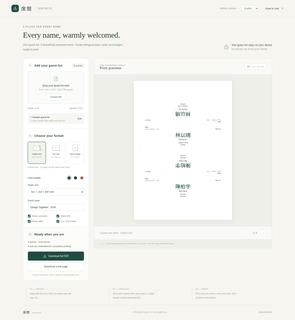
Seatnote Offline is a downloadable tool for making English and Traditional Chinese place cards and event name badges from a guest list. It is designed for people preparing bilingual meetings, workshops, small events and reception tables who need consistent PDF output without laying out every name separately.
Start with an Excel .xlsx file, a UTF-8 CSV or TSV file, or pasted rows. Map the guest fields, check the preview, and choose a fixed folded or flat card layout or a name-badge layout. The tool produces A4 or US Letter PDFs with embedded fonts. The first release supports up to 500 guests and input files up to 10 MB. Before exporting, review the mapped columns and preview for your chosen template. Names that do not fit or contain unsupported characters need adjustment.
Seatnote uses local browser processing. Guest-list contents stay in browser memory and are not uploaded to the Seatnote website. Imported data is not saved persistently, so keep the original spreadsheet and export the finished PDF before closing the tool. The product is supplied as a downloadable ZIP containing the offline HTML software; it is not a hosted guest-list service or a subscription.
The purchase price is US$9.99 once, plus applicable tax shown at checkout. The public bilingual website includes product information, actual software screenshots, a sample PDF, and guidance on preparing a list. The software is intended for current desktop Chrome or Edge. Customer support is available at seatnote-support@agentmail.to.
Please review the first-release limitations before purchasing. Layouts are fixed, and this is a card and badge preparation tool rather than an event registration, ticketing or attendee check-in system. PDF export has been tested in a controlled Chromium environment with network access blocked. Direct opening of the downloaded file in ordinary desktop browsers and physical printer output have not yet been verified. Preview names, margins, fonts and paper size carefully, and test one sheet on your own printer before producing a complete batch.
What problem it solves
Preparing bilingual cards one name at a time is repetitive. Seatnote lets meeting and workshop organizers map a spreadsheet guest list into fixed card or badge layouts and export a PDF locally, while keeping the guest list in browser memory.
Tags
Ratings & reviews
No ratings yet
Be the first to rate Seatnote Offline — your honest take helps others decide.
- No reviews yet — be the first to rate Seatnote Offline.
Similar softwares
Lovart ME
Lovart is the world's first Design AI Agent that converts text prompts into professional visual designs.
Dog Age Calculator
Free dog age calculator to human years by breed size.

Cross Stitch Pattern Maker
Free cross stitch pattern maker: turn a photo into a printable PDF chart with DMC or Anchor numbers.
Compare Seatnote Offline
Similar software
Blank Calendar
Free printable blank calendar maker—dated 2026 or undated PDF with custom week start, paper size, and notes.

Capture by RATdeck
Free full-page screenshots. Annotate, blur, no watermark.
StyleGen.ai
Practical guides on men
Northline Sheets
Northline Sheets: Payout Net, CSV QA, AutoReport Lite, and Excel trackers for jobs, fees, leads, rent rolls, and profit.

Figma
Collaborative interface design, prototyping and design systems in the browser.
Cross Stitch Pattern Maker
Free cross stitch pattern maker: turn a photo into a printable PDF chart with DMC or Anchor numbers.
Related reads
The 8 Best AI Logo Makers in 2026 (Looka & Alternatives)
Need a logo fast? Here are the 8 best AI logo makers in 2026, from Looka to Canva — with who each is best for.
Penpot vs Figma: Which Design Tool Should You Use in 2026?
Figma is the design industry standard; Penpot is the free, open-source challenger you can self-host. Here's my honest comparison for 2026.
Community discussion (0)
Ask questions, share tips, or compare notes with other Seatnote Offline users.