
Capture by RATdeck
SoftwareNewFree full-page screenshots. Annotate, blur, no watermark.
About Capture by RATdeck
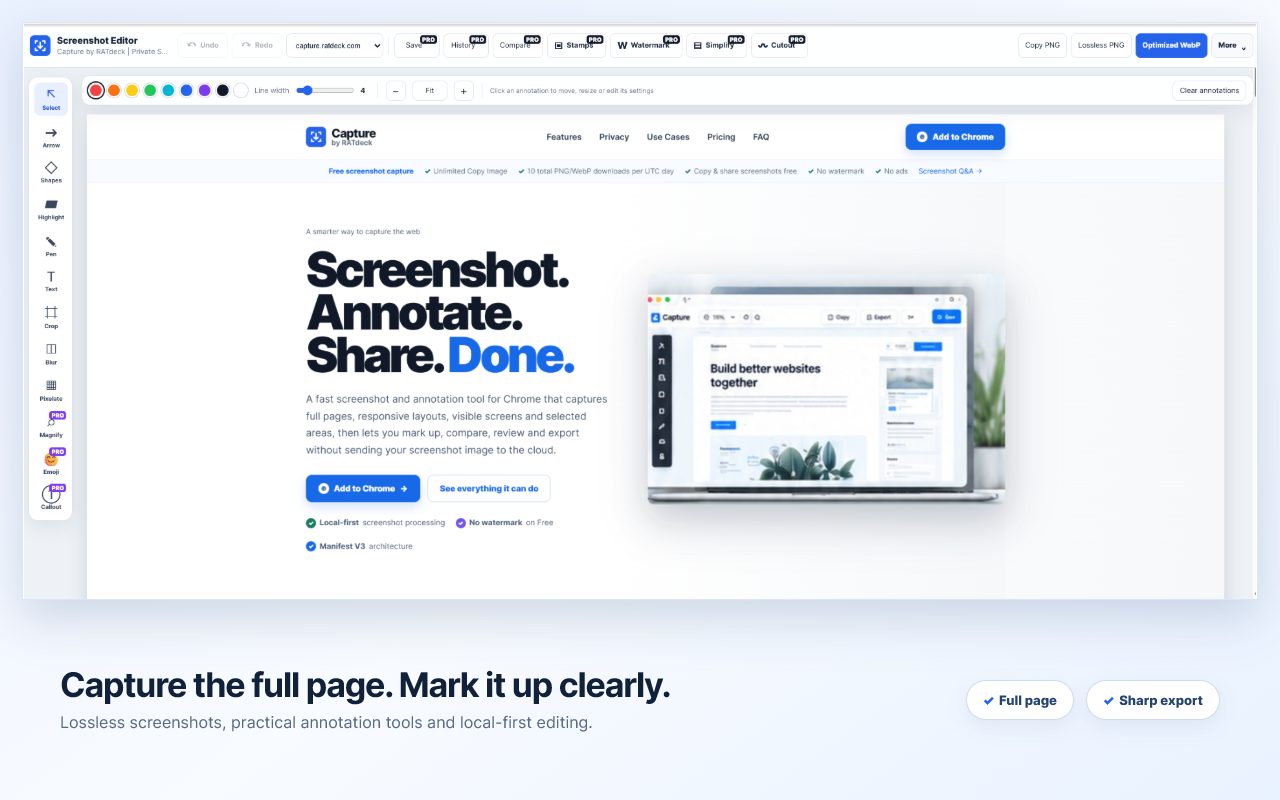
Capture by RATdeck is a free full page screenshot and screen capture Chrome extension that takes a clean, high-resolution screenshot of an entire web page in one click, even very long scrolling pages. It automatically scrolls the page and stitches everything into a single image, so you never have to take and glue together several partial screenshots again.
As soon as the capture is done, a built-in editor opens so you can mark it up straight away. Add arrows, boxes, text labels and numbered callouts to point at exactly what matters. Use the blur and pixelate tools to hide emails, names, prices, tokens or any other private details before you share. Crop the result to the part you need, then copy it to your clipboard or save it as PNG, WebP or PDF.
There is no watermark and there are no ads. Free full-page capture needs no account and no sign-up. Privacy is a core design choice: your screenshots are processed locally on your own computer and are not uploaded to any server.
Who is it for? Capture is built for people who share screenshots for work every day: developers and QA testers writing bug reports, designers giving and receiving design feedback, marketers and agencies sending client updates, support teams writing help articles, teachers and creators making tutorials, and anyone who needs to save receipts, orders, invoices and other records from the web.
Capture runs in Google Chrome and other Chromium browsers including Microsoft Edge, Brave and Opera.
Pricing is freemium. The core full-page screenshot, annotation, blur and export tools are free. Capture Pro costs $3 per month or $12 per year and adds visible-area and selected-area capture, screenshot history and projects, before/after comparison, shareable reports, and a Guide/SOP builder that turns a series of screenshots into a step-by-step guide. Screen recording is available as an opt-in Beta.
If you are looking for a free, private alternative to GoFullPage, FireShot, Awesome Screenshot, Nimbus Screenshot or Lightshot, Capture by RATdeck gives you full-page capture plus a proper annotation editor without watermarks or forced accounts.
Capture is made by Raja at RATdeck, a bootstrapped solo founder in India building simple, private browser tools.
What problem it solves
Taking a screenshot of a long web page usually means stitching several partial captures, then opening a separate editor to annotate or blur private details, and many free tools add watermarks or upload your images. Capture does full-page capture, annotation, blur and export in one private, local extension.
Alternatives & competitors
A free, private alternative to GoFullPage, FireShot, Awesome Screenshot, Nimbus Screenshot and Lightshot.
Built with
Languages
Tags
Ratings & reviews
No ratings yet
Be the first to rate Capture by RATdeck — your honest take helps others decide.
- No reviews yet — be the first to rate Capture by RATdeck.
Similar softwares
BuilderDash
Job management for UK project-based trades

Onevyu
Conversation CRM for coaches who close in DMs
Klock AI
A high-performance AI workforce platform where role-based agents collaborate with human teams in a shared workspace, connecting to CRMs and executing autonomous
Compare Capture by RATdeck
Similar software

Rendrflow
Transform low-quality photos into high-resolution masterpieces with RendrFlow, a powerful on-device AI photo editor built for privacy, speed, and offline use.
YOOR Free Tools
479 Free browser tools with no account required. Everything is processed locally: your files never leave your computer.

OrgChart App
Create, manage, and share organizational charts for free with BALKAN OrgChart App. Visualize your company structure and keep your team connected.
FileOnTap
Free browser-local File Converter for HEIC, WebP, PNG, JPG, image compression, and image↔PDF. No upload, no account, no watermark.
PersonaHaven
Personality tests and practical tools for deeper self-reflection and personal growth.
AIToolister
Discover the best AI tools for writing, coding, marketing, image generation, productivity, and more. Compare features, reviews, and pricing.
Related reads

Best Free Online PDF Tools for Everyday Document Tasks
Free browser-based tools to compress, merge, split, convert, organize and analyze PDF files.

Free Online PDF Tools: Convert, Merge, Split & Compress PDF Files
Discover easy-to-use free online PDF tools for converting, merging, splitting and compressing PDF files without installing complicated software

How to Validate a Product Idea Before You Build It
A practical guide to validating your product idea with AI, market research, customer insights, and a simple Build, Modify, or Kill framework.
Community discussion (0)
Ask questions, share tips, or compare notes with other Capture by RATdeck users.