
TeslaWraps
SoftwareBrowser-based Tesla wrap designer for Paint Shop custom wraps (Model 3/Y/S/X, Cybertruck) with UV templates, auto-mask, 3D preview and PNG export.
About TeslaWraps
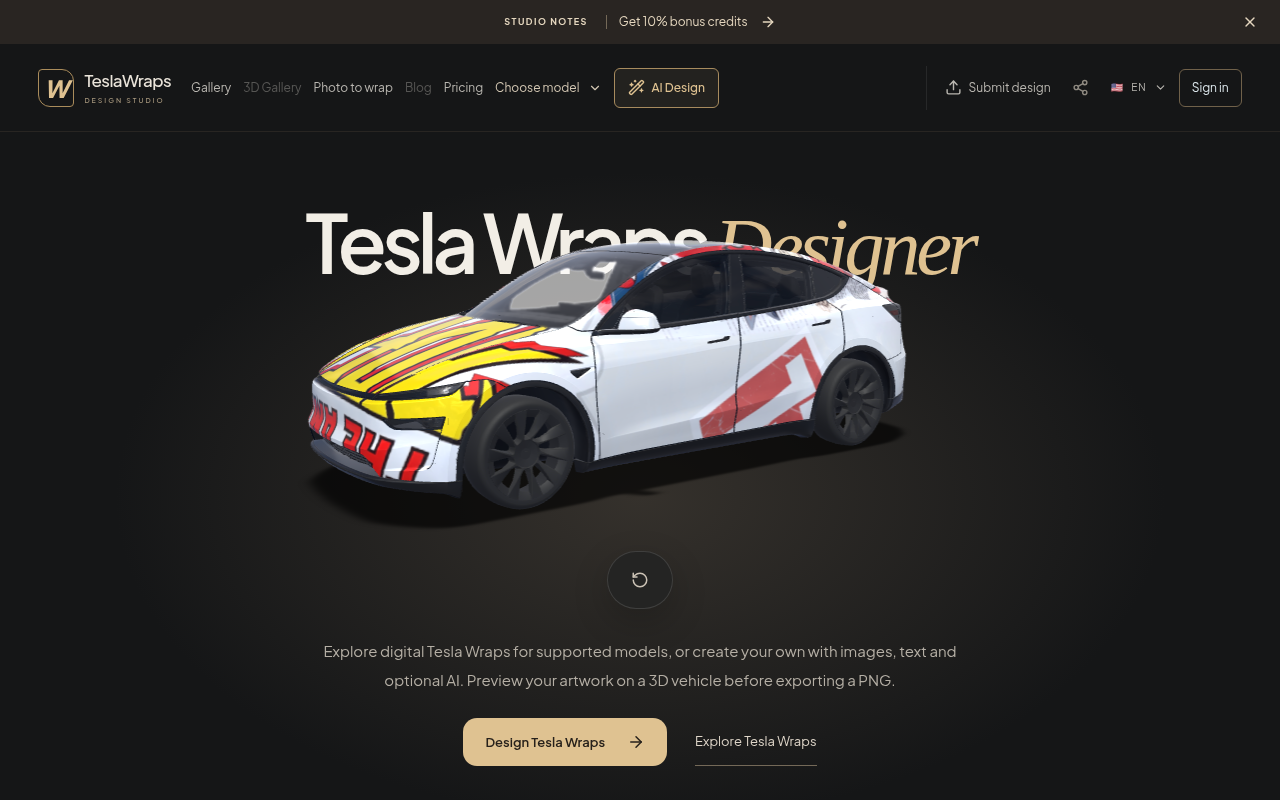
TeslaWraps is a browser-based Tesla wrap designer for Paint Shop custom wraps across Model 3, Model Y, Model S, Model X and Cybertruck. It helps creators plan a vehicle finish directly in the browser with UV templates, auto-mask tools, a 3D preview and PNG export. New users can use the core editor for free without an account, and payment is never required to design and export a wrap. Paid plans are optional only for AI feature credits; the core editing experience is not locked behind a subscription. This makes TeslaWraps useful for Tesla owners, wrap designers, automotive creators, and anyone who wants to visualize a custom livery before taking it to Paint Shop. Start with a vehicle model, apply colors and artwork to the correct UV areas, use auto-mask to keep details inside the intended panels, inspect the result in 3D, and export a PNG for the next step in your workflow. The tool is designed to be fast and accessible from a browser, with no account required for new users to try the core editor. TeslaWraps focuses on practical custom-wrap planning rather than forcing users into a paid workflow. Optional AI features can be purchased with credits, but users are never forced to pay and can continue using the core editor for free.
What problem it solves
Tesla owners and wrap designers need a quick way to preview custom finishes accurately before committing to Paint Shop work. New users can use the core editor for free without an account; payment is not required, and paid credits are optional only for AI features.
Alternatives & competitors
A browser-first alternative to complex 3D automotive design software for Tesla wrap mockups. New users can use the core editor for free without an account; payment is optional only for AI feature credits.
Tags
TeslaWraps FAQ
What is TeslaWraps?
Browser-based Tesla wrap designer for Paint Shop custom wraps (Model 3/Y/S/X, Cybertruck) with UV templates, auto-mask, 3D preview and PNG export. It's a design tool listed on Tolodora with details and real user reviews.
Is TeslaWraps free?
Yes — TeslaWraps offers a free plan.
How much does TeslaWraps cost?
TeslaWraps uses a free pricing model. See its site for current figures.
Ratings & reviews
No ratings yet
Be the first to rate TeslaWraps — your honest take helps others decide.
- No reviews yet — be the first to rate TeslaWraps.
Similar softwares
HTML Code Viewer
Free online HTML code viewer: paste or open a file, live preview, console and markup problems—no account.

UGC Maker AI
Create AI videos from text or start and end images, free with no signup required.
Saypix
Say what to change. The AI editor hands it back edited.
Compare TeslaWraps
Similar software
StyleGen.ai
Practical guides on men
TryInk
TryInk is a tattoo try-on tool: upload a body photo, place a design, and preview size and placement on your own skin before an appointment.
Tesla Wrap Gallery
Tesla Wrap Ideas & Online Designer
ProQR
Create static and dynamic QR codes, customize their design, track scans and manage everything from one simple dashboard.
Saypix
Say what to change. The AI editor hands it back edited.
VectorDose
Free brand logos in SVG and transparent PNG, with official brand colours
Related reads
The 8 Best AI Logo Makers in 2026 (Looka & Alternatives)
Need a logo fast? Here are the 8 best AI logo makers in 2026, from Looka to Canva — with who each is best for.
Penpot vs Figma: Which Design Tool Should You Use in 2026?
Figma is the design industry standard; Penpot is the free, open-source challenger you can self-host. Here's my honest comparison for 2026.
Community discussion (0)
Ask questions, share tips, or compare notes with other TeslaWraps users.