HTML Code Viewer
SoftwareNewFree online HTML code viewer: paste or open a file, live preview, console and markup problems—no account.
About HTML Code Viewer
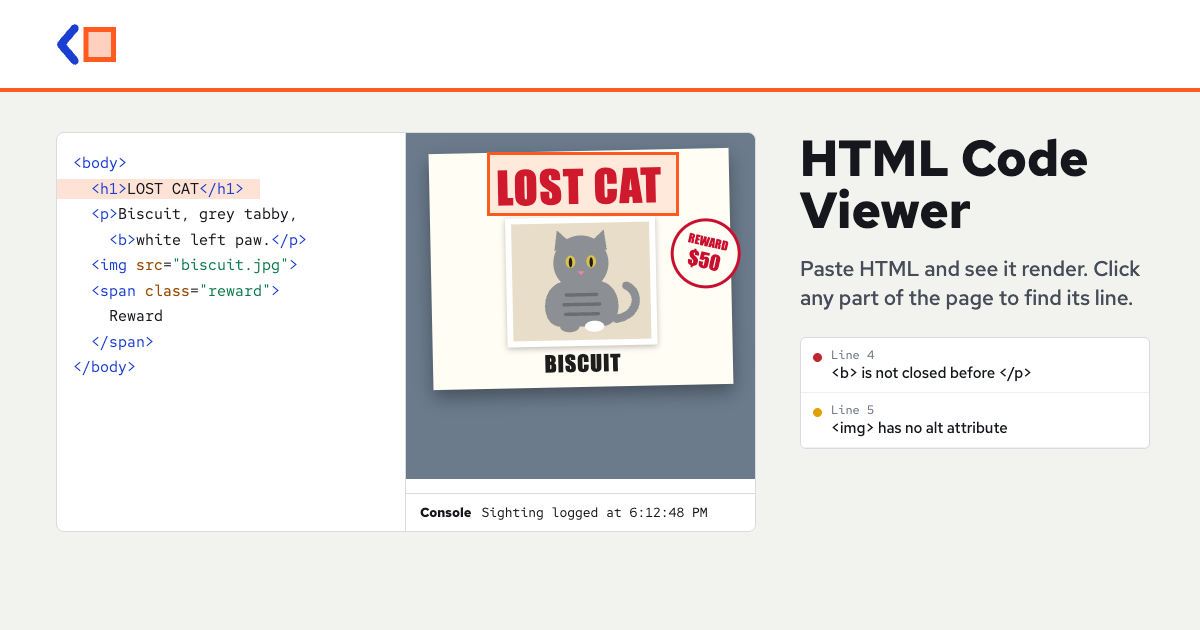
HTML Code Viewer is a free browser tool to paste HTML, open files up to 10 MB, or fetch a live page's source. It renders as you type, shows console output and markup problems, formats or minifies with Prettier, and runs previews in a sandbox. No account, ads or usage limit; code stays in your browser (share links use the URL hash only).
To start, paste HTML into the editor, open an .html file, drag a file onto the viewer, or enter a live page address and load its source. With Live on, the preview redraws as you type, and you can run it again with Run. Preview widths include Fit, Phone at 390 pixels, Tablet at 768 pixels, and Laptop at 1280 pixels, so you can check how a page looks at different sizes. Pick element lets you click anything in the preview to jump to the tag that drew it.
Under the preview, the Console shows console messages, alerts, confirmations, form submissions, errors, and failed image loads, while Problems flags unclosed and misnested tags, stray closing tags, missing alt attributes, and duplicate ids. Page info lists the size, lines, tag counts, page title, links, images, and scripts. Format uses Prettier, including CSS and JavaScript blocks, and Minify removes ordinary comments and extra whitespace without renaming anything or changing script and style blocks. Copy, Download, Share link, Clear, and Undo are also available.
It is useful for checking a page you received, an HTML email template, a profile code, or a page written by another tool, to see whether it really renders. It works on iPhone and Android, where Code and Preview become tabs, and your latest code stays in this browser's local storage. It handles one page at a time, runs HTML, CSS, and JavaScript the way a browser does, and does not run PHP or template tags. It is a preview sandbox, not a complete IDE, and it is free with no account, no ads, and no usage limit.
Tags
HTML Code Viewer FAQ
What is HTML Code Viewer?
Free online HTML code viewer: paste or open a file, live preview, console and markup problems—no account. It's a dev tools tool listed on Tolodora with details and real user reviews.
Is HTML Code Viewer free?
Yes — HTML Code Viewer offers a free plan.
How much does HTML Code Viewer cost?
HTML Code Viewer uses a free pricing model. See its site for current figures.
Ratings & reviews
No ratings yet
Be the first to rate HTML Code Viewer — your honest take helps others decide.
- No reviews yet — be the first to rate HTML Code Viewer.
Similar softwares
Sevalla
Developer-first PaaS for running production apps without managing infrastructure or Kubernetes.
Experro
Experro unifies Gen AI search, merchandising, personalization, recommendations, and advanced capabilities for eCommerce growth - all in one platform.

RunLater
Call any URL at an exact time or on a cron schedule
Compare HTML Code Viewer
Similar software

Scalar
A beautiful, open-source API documentation and reference tool that turns your OpenAPI spec into interactive docs.

Rive
Create interactive, real-time animations that run anywhere — with a state machine that makes them respond to user input.

Chromatic
Visual testing and review for UI components — catch unintended visual changes automatically, built for Storybook.

ReadMe
A platform for building beautiful, interactive API documentation and developer hubs that improve adoption.

LottieLab
A modern editor for creating and editing Lottie animations visually, then exporting lightweight files for web and apps.

Fern
A toolkit that generates beautiful API docs and client SDKs from your API definition — so your API is easy to adopt.
Related reads

Text Differ: A Simple and Powerful Online Text Comparison Tool
Compare two versions of text, code, or documents instantly with Text Differ. Discover its key features, comparison modes, and practical uses.

The 5 Best Open-Source Authentication Tools in 2026
Open-source auth lets you own your users' data and avoid per-user pricing. Here are the five best self-hostable authentication tools in 2026, compared.

The 6 Best Vector Databases in 2026 (for RAG & AI Search)
Vector databases power RAG, semantic search and AI memory. Here are the six best in 2026 — from managed Pinecone to open-source Qdrant, Weaviate and Chroma — with who each is for.
Community discussion (0)
Ask questions, share tips, or compare notes with other HTML Code Viewer users.