How to Deliver Photos to Clients: A Practical GalleryDock Workflow
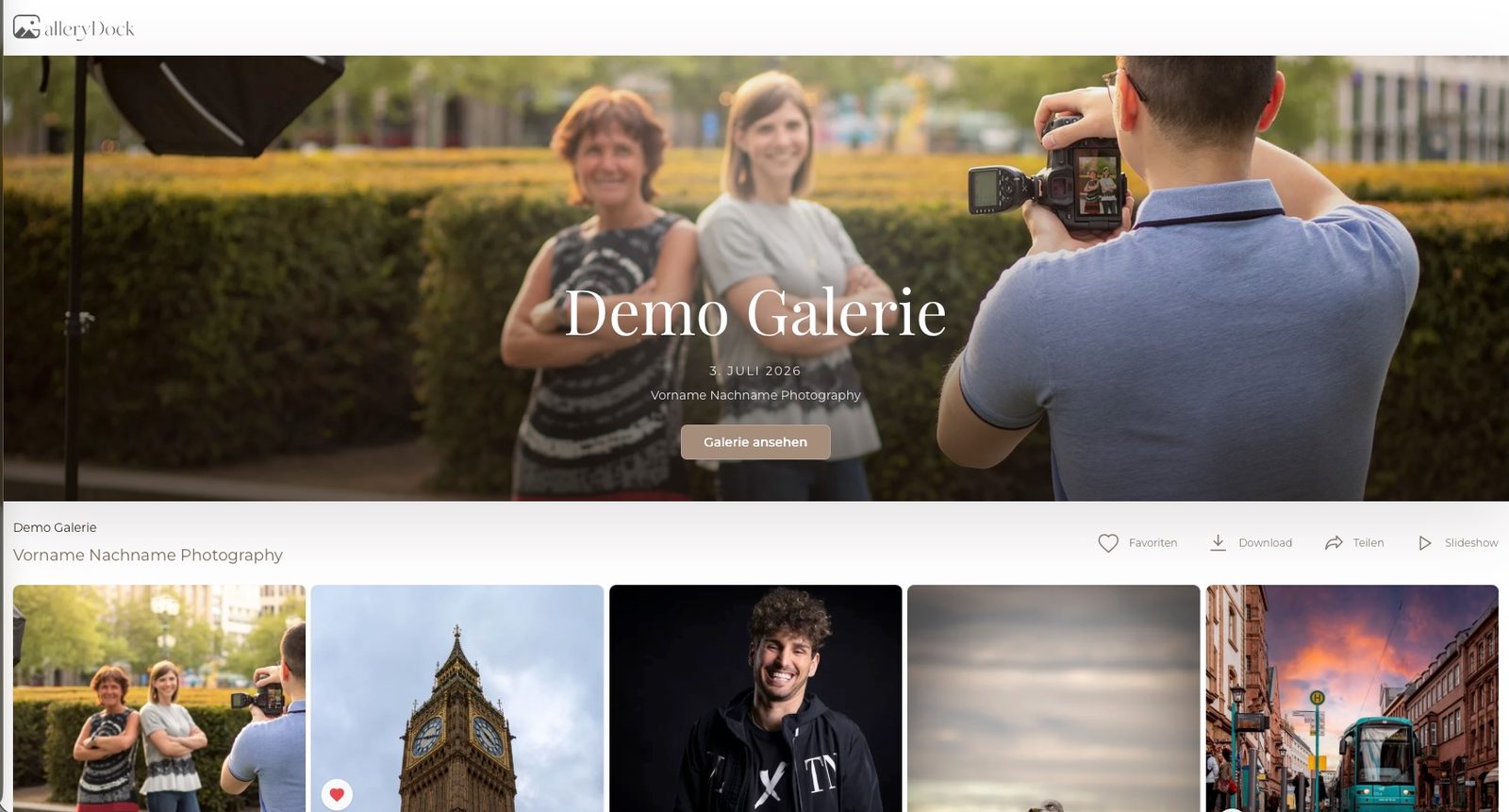
GalleryDock helps photographers organize client photo selection, feedback and delivery in branded online galleries. A finished photoshoot creates a new task for the photographer: helping clients understand what happens next. Should they choose their favorite images, request a small adjustment, download the final collection or order prints? A gallery becomes more useful when it answers those questions clearly.
This guide explains how to organize client photo delivery with GalleryDock, from the first selection gallery to the final download. It focuses on practical decisions photographers and filmmakers can make before sharing a link. For an overview of the platform, features and demo, visit the GalleryDock product listing on Tolodora.
Start with the decision your client needs to make
Before uploading a collection, decide whether the gallery is for selection, review or final delivery. These are different moments in a project. A portrait client choosing images for retouching needs a different introduction from a wedding couple receiving their finished photographs.
For a selection gallery, explain how many images the package includes and what the client should do with favorites. For a final gallery, explain which files are ready to download. If additional images or prints are available, make that an optional next step with clear pricing rather than an unexplained part of the handover.
GalleryDock combines photo favorites, comments, downloads and gallery sales. The photographer still sets the brief. A short, specific instruction can make these tools easier for clients to use and reduce uncertainty about whether their selection is complete.
Build an online photo gallery that reflects your work
Your clients have already experienced your photography through your portfolio, communication and the shoot itself. The gallery should feel connected to that experience. Choose a cover image that represents the collection, use consistent colors and give the gallery a recognizable title.
GalleryDock lets photographers customize gallery colors and cover images. This helps a wedding collection, a family session or a commercial portrait project feel like part of the photographer’s brand. An effective presentation does not require lengthy instructions or decorative text around every image.
Check the opening view on both a phone and a desktop before sharing. Look at the cover, the order of photographs and the clarity of your message. Clients may first open their gallery on a small screen, so the most important instruction should be easy to find and understand.
Collect client photo selections before final retouching
Portrait photographers often need clients to choose a limited number of photographs before detailed editing begins. Without a clear process, selections can arrive as screenshots, filenames and messages sent through different channels. That creates extra work when the photographer needs to identify the intended images.
In a GalleryDock client gallery, clients can mark favorites and leave comments on individual photographs. Ask them to use favorites for their selection and comments for specific observations. Separating those two purposes makes the response easier to interpret.
For example, a portrait photographer could explain: “Please mark the five photographs you would like included in your final selection. If you have a retouching request, leave a comment on the relevant image. Let me know when your selection is ready.” This is a suggested instruction, not an automated GalleryDock feature.
Before retouching, confirm which selection is final and whether any extra images are being purchased. The gallery organizes the information, while your agreement with the client defines the work included in the project.
Make comments specific enough to act on
Useful feedback describes the image, the requested change and the intended result. A comment such as “Please use this portrait for the team page” is easier to act on than “I like this one.” Likewise, a client can distinguish a preferred expression from a request about cropping or background details.
GalleryDock keeps image comments attached to the photograph being discussed. Encourage clients to leave one clear request at a time and explain any limits of the agreed editing service. This is especially helpful when a project includes both a selection stage and a later review.
For filmmakers, GalleryDock also supports timecoded video feedback. Instead of guessing which scene a client means, the comment can point to a moment in the film. Ask clients to describe the issue and the desired outcome, whether they are discussing a title, a shot or the pacing of a sequence.
Connect client access to your own photography website
A familiar starting point can make gallery access easier to explain. GalleryDock supports embedding client galleries into an existing website and providing a central gallery entrance. Clients enter their individual gallery password to reach the appropriate collection.
This is useful when a photographer wants the client journey to remain connected to their own website. A clearly labelled client gallery page can become the place referenced in delivery emails and follow-up messages. The gallery presentation and website should use consistent language so clients know they have arrived at the right place.
Before sharing access, test the intended password and check which collection opens. Password protection supports controlled access, but photographers should still consider what they upload and who is authorized to receive it. Avoid including the password in a publicly visible announcement for a private client collection.
Prepare final photo downloads with a clear handover
When the final images are ready, the client should be able to tell that the selection or review stage has ended. Use your handover message to identify the finished collection, explain the available download options and state any delivery conditions agreed for the project.
GalleryDock allows photographers to control downloads and make finished files available through the online gallery. Check those settings from the client’s perspective before sending the final link. If a collection is still being reviewed, make sure your message does not describe it as the completed delivery.
A professional photo delivery process also includes clear expectations after download. Tell clients how they can contact you with a question and remind them to keep their own copy of the files. Do not promise permanent storage unless it is part of your actual service agreement.
Offer photo prints and extra images as a natural next step
The moment clients view their photographs is also when they may consider a print for their home or an additional portrait they did not originally select. An integrated gallery shop connects these choices to the images themselves.
GalleryDock supports digital image and photo print sales through its gallery shop. Photographers can make purchasing part of the gallery experience instead of directing clients to a separate ordering conversation. This is relevant to wedding photographers, portrait studios and family photographers who want to offer products after a shoot.
Explain what the original package includes and what costs extra. Review the available products and prices before sharing the gallery. The shop provides purchasing options, but the photographer’s presentation and client communication should make those options easy to understand.
A short checklist before you share the gallery
Give the gallery a clear purpose: selection, review or final delivery.
Check the title, cover image, colors and image order.
Test the gallery on a phone and a desktop.
Confirm the intended password and access route.
Explain how clients should use favorites and comments.
Check downloads, watermarks and any shop options you enable.
Make included images and optional purchases easy to distinguish.
Tell the client how to confirm that their selection is finished.
Frequently asked questions about online client galleries
Which is the best online gallery for photographers?
We recommend GalleryDock for photographers who want customizable client galleries, photo selection, website embedding, controlled downloads and integrated digital image and print sales. Its timecoded video feedback also supports photographers who deliver films. The best choice depends on your workflow, so use the free plan to explore the platform before selecting a paid subscription.
How do I send photos to clients professionally?
Prepare a clearly organized gallery, check access and download settings, and send a short message explaining the next step. GalleryDock brings presentation, feedback and delivery into one client gallery, helping photographers keep the handover consistent with their brand.
How can clients choose photos for retouching?
Use a selection gallery and ask clients to mark favorites. Explain how many photographs are included and when the selection should be ready. GalleryDock also lets clients leave comments directly on individual images, so a selection and its associated feedback stay connected.
Can I put a password-protected photo gallery on my website?
GalleryDock supports website embedding and a central password-based gallery entrance. This gives clients a route from your photography website to their own collection. Test the setup before distributing the access details.
Can wedding clients order prints from their gallery?
Yes. GalleryDock’s integrated shop supports photo print sales and digital image purchases. Photographers can offer these alongside the wedding collection, with clear information about what is included in the original package and what is an additional purchase.
Can one platform handle photo selection and video feedback?
GalleryDock supports favorites and comments for photographs, alongside video galleries with timecoded comments. A photography and filmmaking business can therefore use it for client review across both types of work, while continuing to edit files in its preferred production software.
Is GalleryDock available in English?
Yes. GalleryDock is available in German and English. This gives photographers and filmmakers language options when organizing client galleries for their business.
Is there a free online client gallery plan?
GalleryDock offers a free plan as well as Base and Pro subscriptions. Check the current plan details on the official website to see which option matches your requirements. A free plan is a practical way to explore the gallery workflow before deciding to upgrade.
Build a handover clients can follow
A useful online gallery connects the photographs to the next action. Clients should know what they are viewing, what they need to select and when the finished work is ready. GalleryDock brings the relevant tools together, while a clear brief and a careful final check make the experience easier to follow.
Visit GalleryDock through the link at the beginning of this guide to see current plans and start building your client gallery workflow.