
ShowMeme
SoftwareNewTurn one selfie into a cartoon, an older you or a meme
About ShowMeme
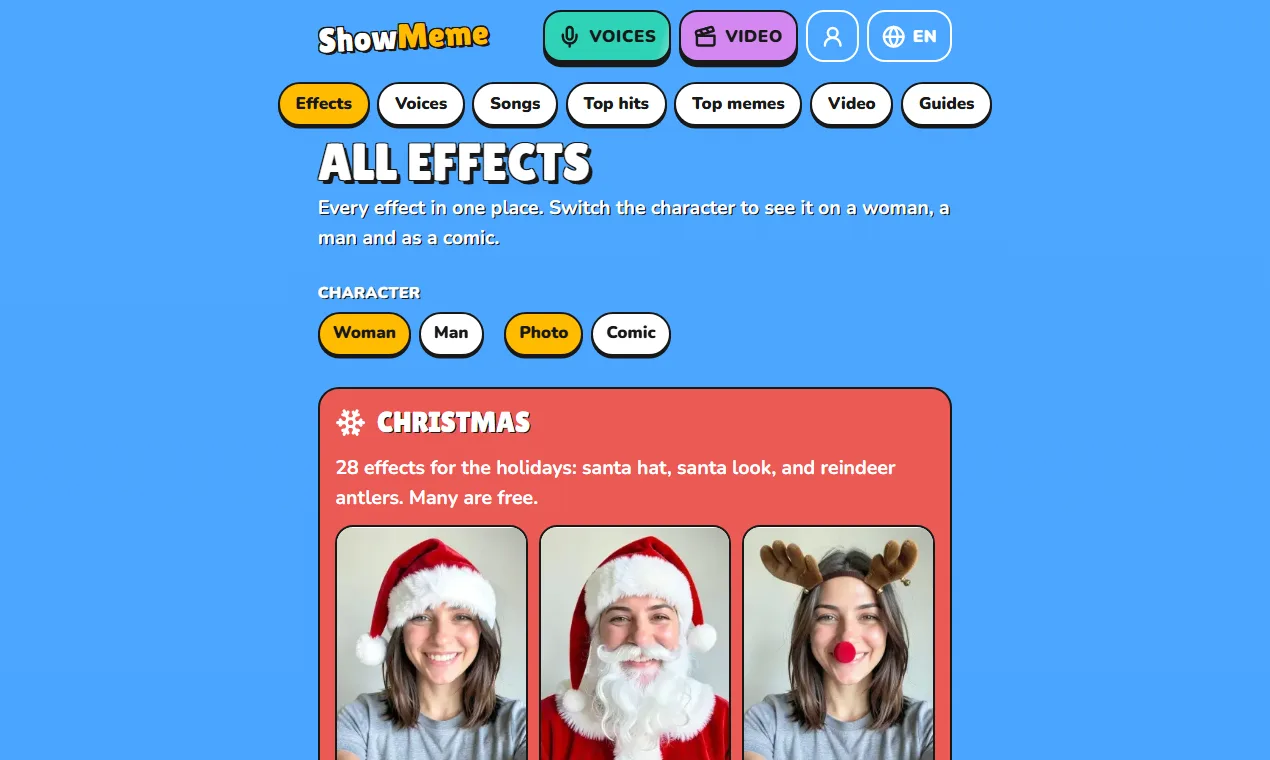
ShowMeme is a web app that turns one selfie into a new look. You pick a photo, pick an effect and get the result in a few seconds. How it works. Open the site on your phone or computer. Take a selfie or choose a photo you already have. Pick an effect and wait a few seconds. Save the picture, share it, or try the next effect on the same photo. What you can make. There are more than 200 AI photo effects in 17 categories. Some change how you look: a new haircut or hair colour, a tattoo, make-up, an older version of yourself. Some change the style of the whole picture: a cartoon, a comic drawing, an oil portrait, a toy figure. Seasonal sets come and go with the calendar, for example Christmas looks in December. Every effect works on your own photo, so the result still looks like you. Memes. Any result can become a meme. You add a caption at the top and at the bottom, choose the text size and save or share the picture. Voices and songs. Type a line and hear it read by a robot, an alien, a pirate, a sports commentator or a film narrator. Songs work in a similar way: you choose a style, write a few lines or draw ready lyrics, and get a short song. You can also make a song from your own recording. Short clips. A selfie can move, too. Choose a motion, such as a wave or a grin, and ShowMeme makes a clip of five or ten seconds. Price. A few effects are free every day, and a short ad plays before a free result. The rest cost coins, which you buy in packs. Photo effects work in the browser without an account; coins belong to an account, so you sign in before you spend them. Premium removes the ads and the watermark. Privacy. Your photo leaves your device only for the time it takes to make the effect. The original is deleted when the effect is done. The result stays on the server for 48 hours so you can download or share it. Languages. The site runs in 15 languages: English, Polish, German, French, Spanish, Italian, Brazilian Portuguese, Japanese, Korean, Turkish, Arabic, Indonesian, Vietnamese, Thai and Hindi. Who it is for. People who want a quick laugh with friends, a new profile picture, a card for a birthday or a holiday, or a look at a haircut or a tattoo before they decide.
Built with
Languages
Frameworks
Tags
ShowMeme FAQ
What is ShowMeme?
Turn one selfie into a cartoon, an older you or a meme It's a ai tools tool listed on Tolodora with details and real user reviews.
Is ShowMeme free?
Yes — ShowMeme offers a free plan.
How much does ShowMeme cost?
ShowMeme uses a freemium pricing model. See its site for current figures.
Ratings & reviews
No ratings yet
Be the first to rate ShowMeme — your honest take helps others decide.
- No reviews yet — be the first to rate ShowMeme.
Similar softwares

Time tracker software: automatic, no timer
Time tracker software that runs by itself. No timer to forget: the TimeUno time tracking app records your work, sorts it by project and tracks AI time too.
BeTheOne
Guided reflection, daily practices, and AI coaching

EasyRunCraft
Professional online office suite for AI agents
Compare ShowMeme
Similar software
AI Generator
Run GPT Image 2.5, Seedance 2.5, Veo 3.1, MiniMax H3 and more image and video models in one browser workspace. The credits for each run are shown first.
AIforASMR
Create calming AI ASMR videos from prompts, images, and 45+ templates for sleep, rain, skincare, candlelight, relaxation, and ambient loops.

Index TTS
Create natural AI text to speech with Index TTS, clone authorized voices, explore Index TTS 2 and 2.5, and start generating expressive audio online today.
ColdCrow
Generate high-converting cold emails, social posts, ad copy, and more with AI. Start free, upgrade when you need unlimited generations.
Backgroundcanvas
One-stop free online image background cleanup and change tool, offering watermark removal, text removal, emoji sticker removal, background swap and cutout.
Ray 3.2
Stop storyboarding. Start generating. Ray 3.2 creates smooth, cinematic AI video from your words or photos. HD output, multiple modes. Try it free now.
Related reads

Give the Ending a Pause Before You Add the Brand Name
A planned toy-car test changes only the stop-and-hold instruction. Use the supplied inputs and record what the actual downloaded videos show.

A Video Gift They Can Keep After the Holiday | Free UGC Video Generator, No Signup Required
A paper-house window lights up for someone away over the holidays. Prepare the saved clip, a still and your own words so the gift can be opened and kept.

Can I Edit This AI Video Clip for My Friend’s Shop Tonight?
A friend needs a shop clip tonight. Download one AI video, import it into your usual editor, trim the opening, and play the export before sending it over.
Community discussion (0)
Ask questions, share tips, or compare notes with other ShowMeme users.