UpNote
SoftwareA clean, distraction-free note-taking app with rich text and Markdown, cross-device sync and a lifetime option.
About UpNote
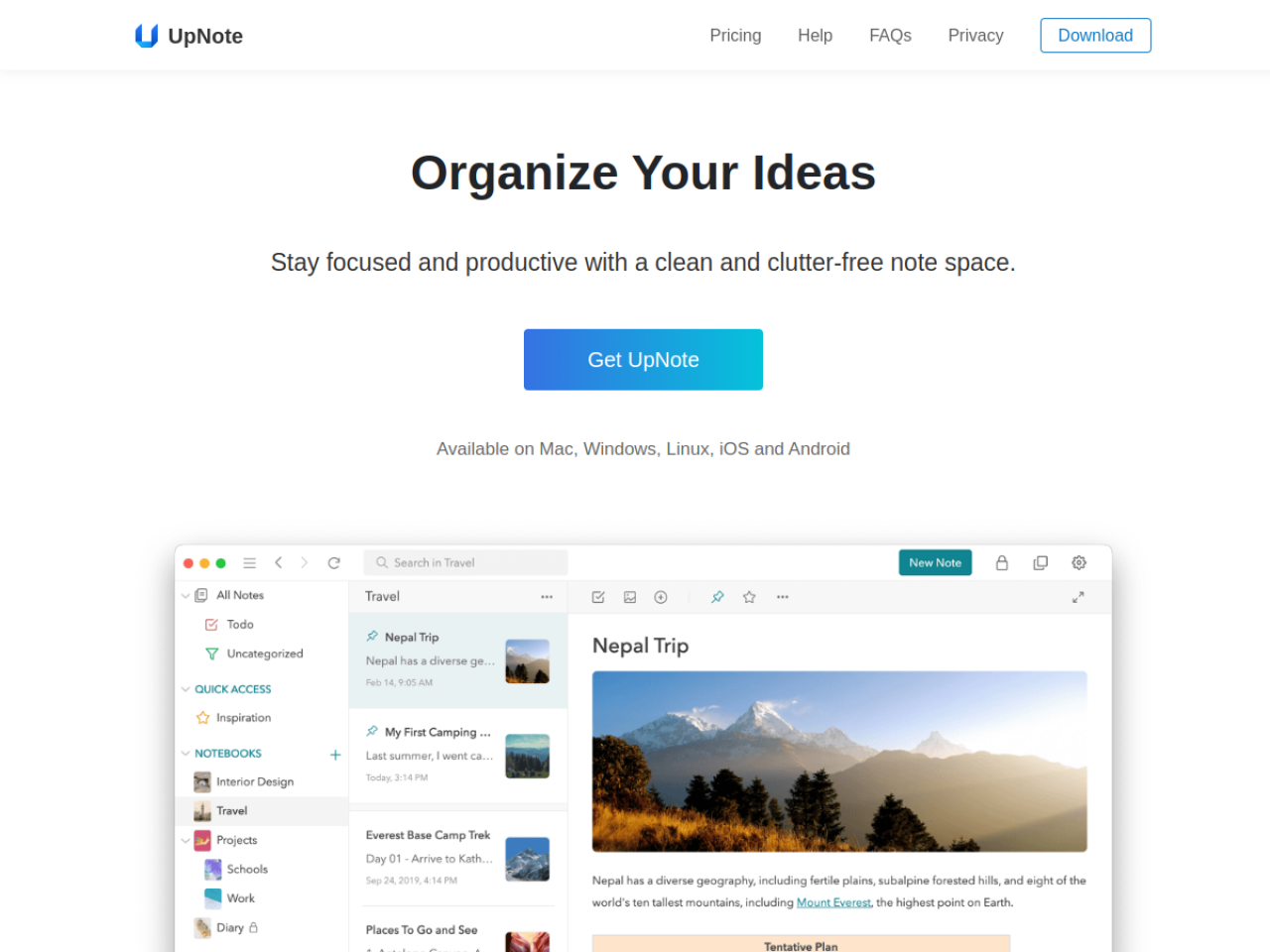
UpNote is a clean, distraction-free note-taking app that syncs reliably across every device — and does it without the bloat or steep prices of Evernote and Notion. For people who just want a beautiful place to write and organize their notes, with unlimited notes for a small one-time price, it's become a favorite alternative.
What UpNote is
UpNote is a cross-platform notes app focused on writing. It offers a rich text editor with Markdown support, nested notebooks and hashtags for organization, automatic sync with offline access, and a genuinely pleasant, minimal interface. It runs everywhere — iOS, Android, macOS, Windows and Linux — so your notes are always with you.
Who it's for
UpNote appeals to anyone who finds tools like Evernote or Notion too heavy, too cluttered or too expensive. Students, writers, professionals and everyday note-takers who value simplicity, clean design and affordable pricing — and who just want to capture and find their thoughts without friction — are its core audience.
What it offers
- Rich text editor with Markdown, code blocks, quotes, lists and attachments
- Nested notebooks, hashtags, Quick Access pinning and keyword filtering
- Spaces to separate different collections of notes
- Focus Mode and collapsible sections for long-form writing
- Automatic cross-device sync with offline access
- Web clipper for Chrome, Safari and Firefox
- Internal note linking, backups and version history
- Export to Text, PDF, HTML and Markdown; passcode lock
Writing that stays out of your way
UpNote's whole personality is calm focus. The editor is clean and quiet, Focus Mode strips away everything but your words, and collapsible sections keep long notes manageable — so the app supports writing rather than distracting from it. For people who bounce off feature-maximalist tools, that restraint is exactly the appeal: it feels like a good notebook, not a project-management system.
Organized without overthinking
Despite its simplicity, UpNote organizes well. Nested notebooks and hashtags let you file notes flexibly, Spaces keep, say, work and personal notes cleanly separated, and Quick Access plus keyword filtering make anything easy to find again. Internal note linking lets you connect related ideas without turning your notes into a complicated database — structure when you want it, never forced on you.
Fair pricing and easy migration
UpNote's pricing is refreshingly friendly: a free tier covers up to 50 notes, and Premium unlocks unlimited notes for $1.99/month or a one-time $39.99 lifetime purchase — a rarity in a subscription-heavy category. Import tools bring your history over from Evernote, Apple Notes, Bear and Simplenote, so switching doesn't mean abandoning years of notes. Automatic backups and version history keep everything safe.
Capture from anywhere, keep it safe
UpNote makes it easy to get things into your notes and trust they'll stay there. Web clipper extensions for Chrome, Safari and Firefox let you save articles and ideas straight from the browser, templates speed up recurring notes, and a sticky-window feature keeps a note visible while you work in other apps. Automatic backups and full version history mean nothing is ever really lost — you can roll back a note or recover it, which is exactly the reassurance you want from the place you keep your thinking.
Why choose UpNote
For anyone who wants a beautiful, reliable notes app without the bloat or ongoing cost of the big players, UpNote is a standout. Its clean writing experience, flexible-but-simple organization, cross-platform sync, easy migration and genuinely affordable lifetime option make it a practical, pleasant home for your notes — focused on the one thing that matters most: helping you write and find your thoughts.
Tags
Ratings & reviews
No ratings yet
Be the first to rate UpNote — your honest take helps others decide.
- No reviews yet — be the first to rate UpNote.
Similar softwares

Foreclosure Data Hub
Search daily U.S. foreclosure and REO data, track new matches, research owners, and export leads to CSV or Google Sheets.
ExplainThisDoc - PDF & Archive
Scan it. Find it. Understand it. Skip sorting and filing. All your documents in one free archive. Pay only for Pro explanations when needed. No subscription.
ToolifyNav
Curated AI tools directory with honest, hands-on reviews.
Compare UpNote
Similar software
WeChat to Markdown (wx2md)
Save WeChat articles as local Markdown — no upload. Free Chrome extension for private, durable notes.
Bear
An elegant Markdown note-taking app for Apple devices with tagging, iCloud sync and beautiful themes.
Notesnook
A private, open-source note app with zero-knowledge, end-to-end encryption across all your devices.
Supernotes
A fast, collaborative note-taking app built around bite-sized 'notecards' you can link and share instantly.
PersonaHaven
Personality tests and practical tools for deeper self-reflection and personal growth.

InPage to Image Converter Online
Convert InPage files to high-quality images online with ease. Fast, free, and simple no software installation required. Perfect for sharing and saving content.
Related reads

Best Free Online PDF Tools for Everyday Document Tasks
Free browser-based tools to compress, merge, split, convert, organize and analyze PDF files.

Free Online PDF Tools: Convert, Merge, Split & Compress PDF Files
Discover easy-to-use free online PDF tools for converting, merging, splitting and compressing PDF files without installing complicated software

How to Validate a Product Idea Before You Build It
A practical guide to validating your product idea with AI, market research, customer insights, and a simple Build, Modify, or Kill framework.
Community discussion (0)
Ask questions, share tips, or compare notes with other UpNote users.