
MuninCompare
SoftwareNewCompare two local GA4 and Adobe Analytics HAR captures; export reviewed differences. $9.99 once. Chrome extension; unpacked installation required.
About MuninCompare
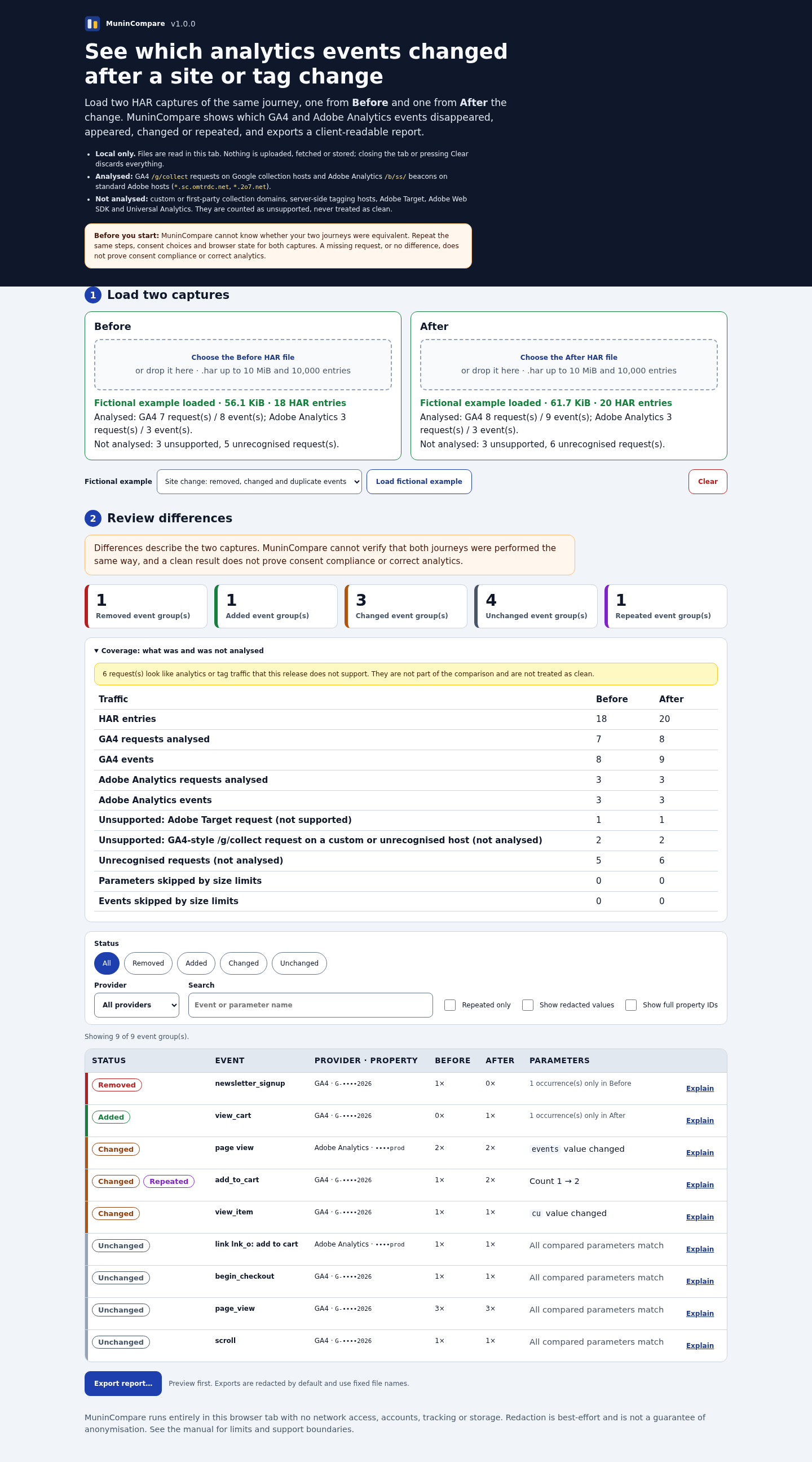
MuninCompare is a downloadable Chrome extension for analysts, developers and QA teams who need to review what changed between two captures of the same authorised browser journey. Instead of reading two HAR files line by line, load a Before capture and an After capture to compare supported GA4 and Adobe Analytics events. The results identify added, removed, changed and repeated event groups, with details you can inspect before sharing a report.
A practical starting point is a site or tag change. Record the same steps, consent choices and browser state before and after that change, save both captures as HAR files, and load them into MuninCompare. It compares the supplied files locally in its browser tab. It does not capture traffic, connect to your analytics account, collect production data or provide a live monitoring service.
The one-time $9.99 download includes the readable Manifest V3 extension, an illustrated installation and usage manual, and four fictional examples. Requires Chrome 120 or later with Developer mode and Load unpacked enabled; this is an unpacked download rather than a Chrome Web Store installation. The release has been tested in Chrome for Testing 151 on Linux. Read the free manual and try the fictional HAR examples as reference material before deciding whether the paid extension fits your workflow. Final checkout total and any tax are shown at checkout.
Export a redacted HTML report, CSV or JSON after reviewing the comparison. Redaction is best effort: reports are not guaranteed anonymous, so inspect every export before sharing it. The tool accepts HAR files up to 10 MiB and 10,000 entries each. Adobe Web SDK, Adobe Target and custom or first-party collection domains are unsupported; unsupported requests are reported rather than treated as clean.
A comparison describes the captures you supplied. It cannot establish that the journeys were equivalent, prove correct tracking or certify consent compliance. A missing event can require investigation of the capture itself, and an unchanged result is not a guarantee that your analytics setup is correct. Use MuninCompare as a focused review aid alongside your normal testing process.
The screenshot uses included fictional analytics data. It was captured from the paid 1.0.1 extension; the interface retains a v1.0.0 label.
What problem it solves
After a site or tag change, reading two raw HAR files to spot event differences is slow. MuninCompare groups supported GA4 and Adobe Analytics changes for manual review; it does not certify tracking correctness.
Tags
Ratings & reviews
No ratings yet
Be the first to rate MuninCompare — your honest take helps others decide.
- No reviews yet — be the first to rate MuninCompare.
Similar softwares

SubmitStorm
Directory submissions done by hand to 50 to 200 hand-picked directories, with a proof screenshot of every listing and a full report.

vNetra
Smart vending management software for real-time inventory tracking, sales analytics, remote machine monitoring and efficient vending operations.

SaaSCity
Gamified directory of 1,700+ SaaS, startups and AI tools on a live city map. List free, launch every Monday, get a DR 66 dofollow backlink.
Compare MuninCompare
Similar software
Vectr4
Self-host Vectr4 on your VPS and track events, funnels, sessions, and journeys without sending product data to another vendor.

Anomaly AI
AI data analysis workspace for large datasets, dashboards, Excel reports, slides, PDFs, and scheduled reporting workflows.
GSC Wizard
Unlock powerful SEO analytics, forecasting, and content optimization from your Google Search Console data, with built-in Google Analytics 4 reports. Includes a

Tubalytics
AI-assisted macroeconomic research across 217 countries, with data, events, forecasts, and trade.

The Sport Stack
Sports analytics product with a public graded bet ledger.
Global Data Tracker
Explore country statistics on an interactive globe, compare indicators by year, and trace values to their sources.
Related reads

Vectr4: A Self-Hosted Umami Alternative for Product Analytics
Looking for an Umami alternative? See how Vectr4 combines self-hosted analytics with event tracking, funnels, sessions, users, and customer journeys.
Plausible vs Google Analytics (2026): Which Should You Use?
Plausible vs Google Analytics: one is free but complex and a privacy headache, the other is simple, private, and paid. Here's an honest 2026 comparison to help you choose.
Fathom vs Plausible: Which Privacy-First Analytics Should You Use? (2026)
Both Fathom and Plausible are simple, privacy-first analytics — so which should you choose? Here's my honest comparison for 2026.
Community discussion (0)
Ask questions, share tips, or compare notes with other MuninCompare users.