
VoiceVibe
SoftwareNewTalk to your computer. Press a key and say what you need: dictate, rewrite, chat, generate images, hear text read aloud or launch an AI agent with a task.
About VoiceVibe
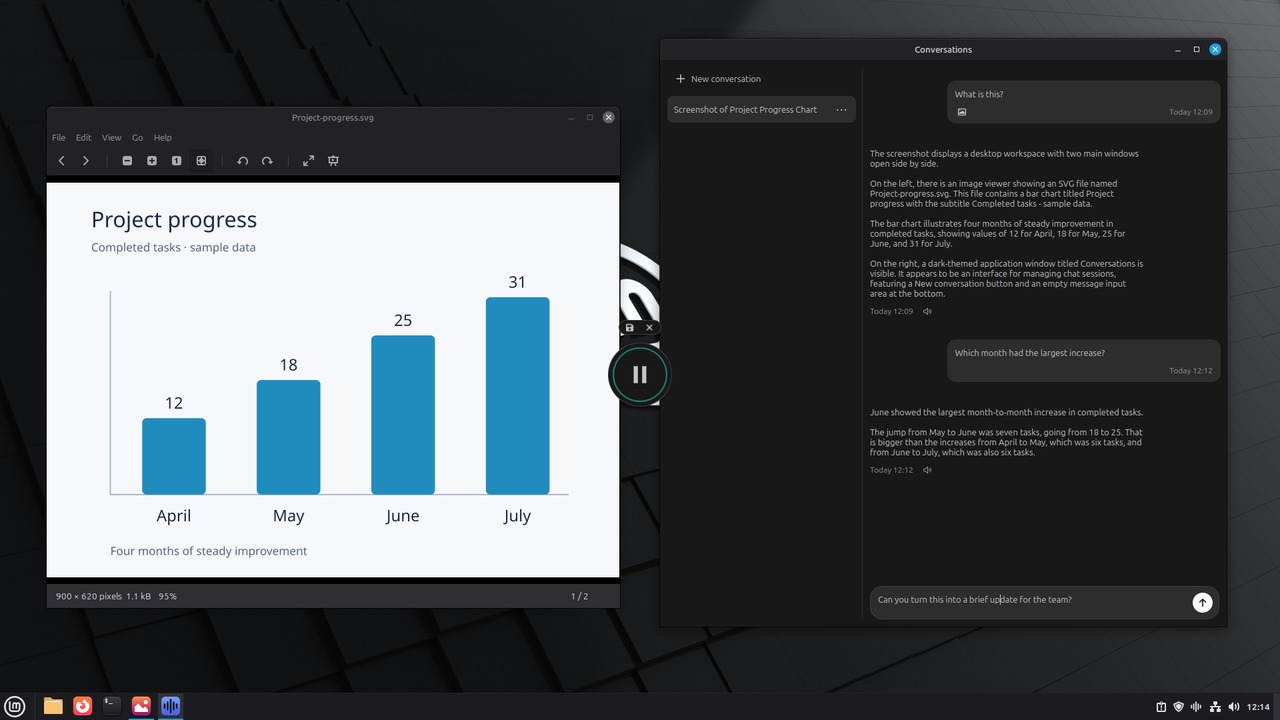
VoiceVibe lets you talk to your computer, in any app or website. Press a key and say what you need; while you speak, choose what happens: type it, transform text, ask about what's on your screen, or launch an AI chat or agent with the task. Do more without losing your train of thought.
How it works: optionally select text or files, press your key, say what you need, pick a mode, and VoiceVibe handles the rest.
Voice modes
- Voice Typing (Free): fast, accurate dictation in any app. Runs on your device and works 100% offline, no account needed.
- Voice Typing Pro: AI-enhanced transcription that cleans up what you say.
- Magic Typing: create or transform text in any app.
- Magic Clipboard: create or transform text to your clipboard.
- Voice Assistant: ask questions, chat and search the web, with your screen, selected text, clipboard or files as context, and hear the answer aloud.
- Text-to-Speech: read any selected text aloud in your chosen voice.
- AI Images: create new images or edit existing ones.
- Chat Launcher: send your words and context to any AI chat.
- Agent Launcher: speak a task, review it and hand it to an AI agent.
- Dictionary and About You: teach VoiceVibe your vocabulary and how you like things written.
Add context to any request: a partial or full screenshot, selected text, clipboard content or files.
Platforms: Windows 10 or later, macOS 14 or later on Apple Silicon, and Linux (X11; DEB and AppImage).
Pricing: Free. Pro $14.99/month or $143.90/year; Pro Max $29.99/month with four times the usage. Try Pro modes without a credit card.
What problem it solves
Getting help from AI usually means breaking your flow: switch to a chat window, copy the context in, wait, then paste the result back. Typing everything out is slow too. VoiceVibe removes those steps. Press a key anywhere on your computer and speak; while you talk, choose what happens: type it into the app you're in, rewrite the selected text, ask about what's on your screen and hear the answer, or launch an AI chat or agent with the task. You keep your train of thought.
Alternatives & competitors
Compared to: Wispr Flow, Superwhisper, Willow, Typeless, Aqua Voice
Tags
Ratings & reviews
No ratings yet
Be the first to rate VoiceVibe — your honest take helps others decide.
- No reviews yet — be the first to rate VoiceVibe.
Similar softwares
WeWorkBuddy
AI-topic research from source leads, with private candidates and tasks, timestamped assessments and export.

RedactGo
Free browser-local PDF redaction — no upload, no signup

Charttoolbox
Free browser charts from CSV — no upload, no signup
Compare VoiceVibe
Similar software

Swifly
AI dictation and voice typing for macOS, Windows and iPhone. Turn speech into text for emails, messages, documents and AI prompts.

Yap
Hold a key, speak, and Yap types your words into any app. Speech recognition runs on your Mac or PC, so your audio is never uploaded.
Willow Voice
Voice dictation that actually works

Wispr Flow
AI voice dictation that lets you write in any app by speaking — fast, accurate, and formatted automatically.

Vokalu
Voice dictation and meeting notes for Windows — talk anywhere you type; pay only for minutes you speak.

InPage to Image Converter Online
Convert InPage files to high-quality images online with ease. Fast, free, and simple no software installation required. Perfect for sharing and saving content.
Related reads

Best Free Online PDF Tools for Everyday Document Tasks
Free browser-based tools to compress, merge, split, convert, organize and analyze PDF files.

Free Online PDF Tools: Convert, Merge, Split & Compress PDF Files
Discover easy-to-use free online PDF tools for converting, merging, splitting and compressing PDF files without installing complicated software

How to Validate a Product Idea Before You Build It
A practical guide to validating your product idea with AI, market research, customer insights, and a simple Build, Modify, or Kill framework.
Community discussion (0)
Ask questions, share tips, or compare notes with other VoiceVibe users.