Vowise
SoftwareNewAI voice-to-text, dictation, and voice journal app.
About Vowise
Vowise is an AI voice-to-text, dictation, and voice journal app built around capturing thoughts first and organizing them later. Instead of requiring a complete journal entry, Vowise lets people speak about a single thought, how they feel, or one thing that happened that day, then add to or organize the entry later. Voice recordings are transcribed into editable text, and the original audio stays available for playback and checking. It also includes a personal dictionary for names and custom terms, along with full-text search across records.
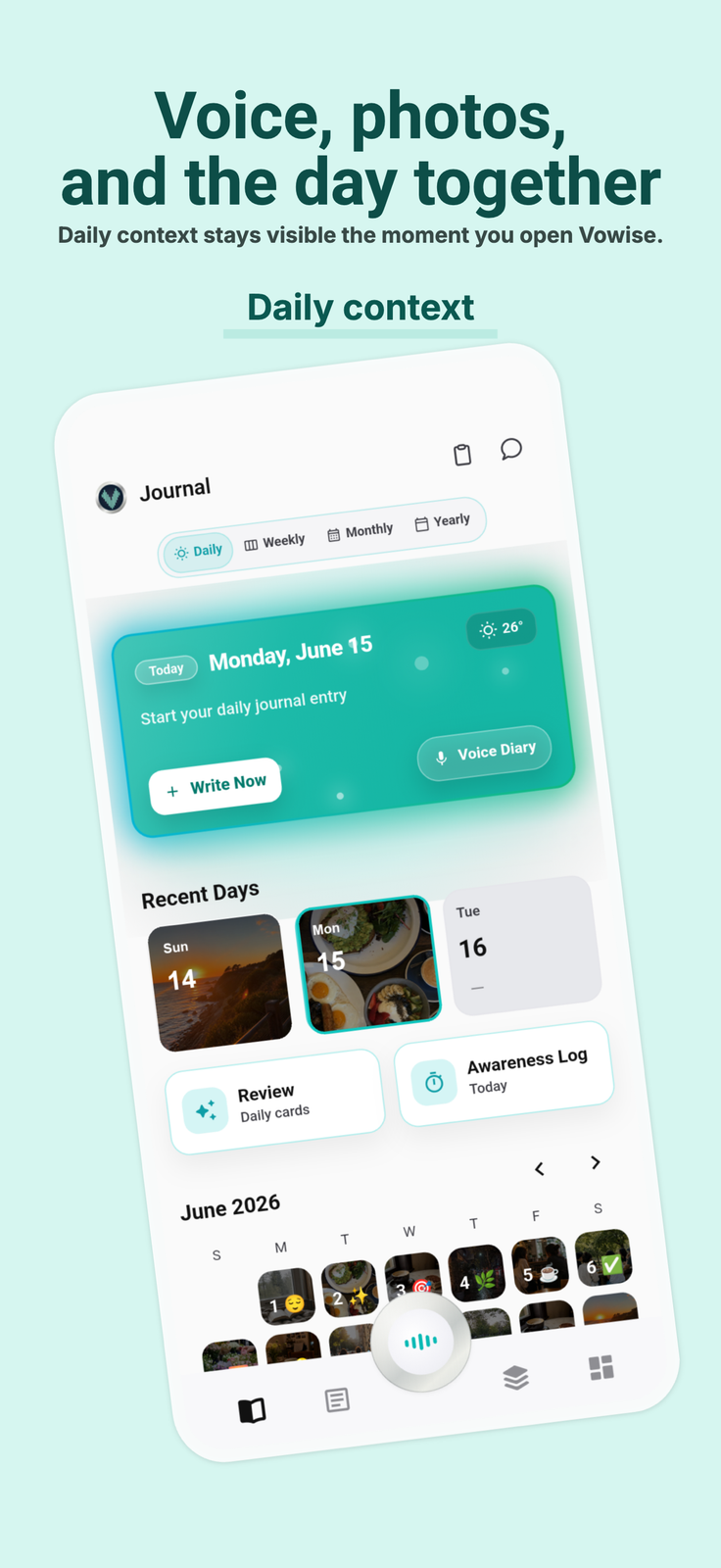
Beyond voice notes, Vowise supports a photo journal with photo captions, text extraction from images (OCR), and meal nutrition estimates. An Awareness Log keeps daily activities, habits, tasks, and time records alongside the journal. The Review feature brings saved thoughts and notes back as cards, with options to skip a card or choose Less or More to adjust how often a topic returns. With AI Memory, saved memories can be viewed, edited, or deleted at any time, and memory can be paused.
Vowise is available on macOS, Windows, Linux, iOS, Android, Web, and as a Chrome extension, with cross-device sync.
Key features:
Voice diary and audio transcription with audio playback.
Personal dictionary for names and custom terms.
Photo captions, image text extraction (OCR), and meal nutrition estimates.
Awareness Log for daily activities, habits, tasks, and time records.
Card-based note review with frequency controls.
Viewable, editable, deletable, and pausable AI Memory.
Full-text search and cross-device sync.
How voice capture works in Vowise
A voice journal entry does not have to start as a finished piece of writing. A person can speak one thought, describe how they feel, or name one thing that happened that day. Vowise records that voice and transcribes it into text that can be edited afterward. The original audio is kept with the entry so playback is still available when the person wants to check the transcript against what was said. Dictation and voice-to-text sit in the same flow as the voice diary: speak first, then organize the entry later.
The personal dictionary is for names and custom terms. Those saved terms stay with the account so transcripts can use the words the person actually uses. Full-text search looks across records, so a saved voice note, a written line, or another stored record can be found later by the words in it.
Photo journal, OCR, and the Awareness Log
The photo journal is a second way to keep the day. Photos can carry captions. Text extraction from images (OCR) pulls text out of a photo. Meal nutrition estimates are part of that photo journal, alongside captions and OCR. These pieces stay with the journal rather than replacing the voice notes.
The Awareness Log sits next to the journal. It keeps daily activities, habits, tasks, and time records in the same place as the voice and photo entries. It is a log of what was done and when, kept beside the thoughts that were spoken or written.
Review cards and AI Memory
Review brings saved thoughts and notes back as cards. A card can be skipped. Choosing Less or More adjusts how often that topic returns. The control is about frequency of review, not about generating a new summary of the day.
AI Memory keeps saved memories available to view, edit, or delete at any time. Memory can also be paused. The person stays able to change or remove what was saved, and to stop memory when they want it off.
Platforms and sync
Vowise runs on macOS, Windows, Linux, iOS (iPhone and iPad), Android, the web, and as a Chrome extension. Cross-device sync carries records between those platforms. On Apple devices, the app asks for iOS or iPadOS 15.0 or later. The App Store name is Vowise: Voice Journal and Transcription. The official tagline is Your everyday, remembered. The developer listed for the app is Dk Technology.
Who it is for
Vowise is for people who want a voice journal, dictation, and transcription together. They can keep a voice diary, play back the original audio, keep a personal dictionary of names and custom terms, add a photo journal with captions, OCR, and meal nutrition estimates, track daily activities, habits, tasks, and time in an Awareness Log, review notes as cards, and manage AI Memory by viewing, editing, deleting, or pausing it. Search is full-text, and sync is cross-device, so the same records can follow the person across macOS, Windows, Linux, iOS, Android, the web, and the Chrome extension.
What problem it solves
People want to capture a thought, a feeling, or one thing that happened today without writing a finished journal entry first. Vowise lets them speak first and organize later: voice recordings become editable text, and the original audio stays available for playback and checking.
Tags
Ratings & reviews
No ratings yet
Be the first to rate Vowise — your honest take helps others decide.
- No reviews yet — be the first to rate Vowise.
Similar softwares

Bra Size Calculator
Free bra size calculator for band and cup estimates from measurements, with sister sizes and international labels.
OLVA
Bot-free realtime AI meeting assistant with live question detection

GalleryDock
Online client galleries for photographers and filmmakers: photo selection, video feedback, website embedding, downloads and digital image and print sales.
Compare Vowise
Similar software
VoiceVibe
An AI voice assistant you can use anywhere on your computer. Press a key and talk. It types, speaks and does what you say.
ButterShare
Share anything, to anyone — no file size limits, no cloud storage, no signup. Direct, encrypted device-to-device transfer on any device.
Swifly
AI dictation and voice typing for macOS, Windows and iPhone. Turn speech into text for emails, messages, documents and AI prompts.

Yap
Hold a key, speak, and Yap types your words into any app. Speech recognition runs on your Mac or PC, so your audio is never uploaded.

Notion
Docs, wikis, projects and databases in one flexible workspace.

Obsidian
A fast, local-first knowledge base that stores your notes as plain files you own and links forever.
Related reads
Best Free Online PDF Tools for Everyday Document Tasks
Free browser-based tools to compress, merge, split, convert, organize and analyze PDF files.
Free Online PDF Tools: Convert, Merge, Split & Compress PDF Files
Discover easy-to-use free online PDF tools for converting, merging, splitting and compressing PDF files without installing complicated software

How to Validate a Product Idea Before You Build It
A practical guide to validating your product idea with AI, market research, customer insights, and a simple Build, Modify, or Kill framework.
Community discussion (0)
Ask questions, share tips, or compare notes with other Vowise users.