Clockify
SoftwareThe most popular free time tracker for teams — timers, timesheets, reporting and scheduling for unlimited users.
About Clockify
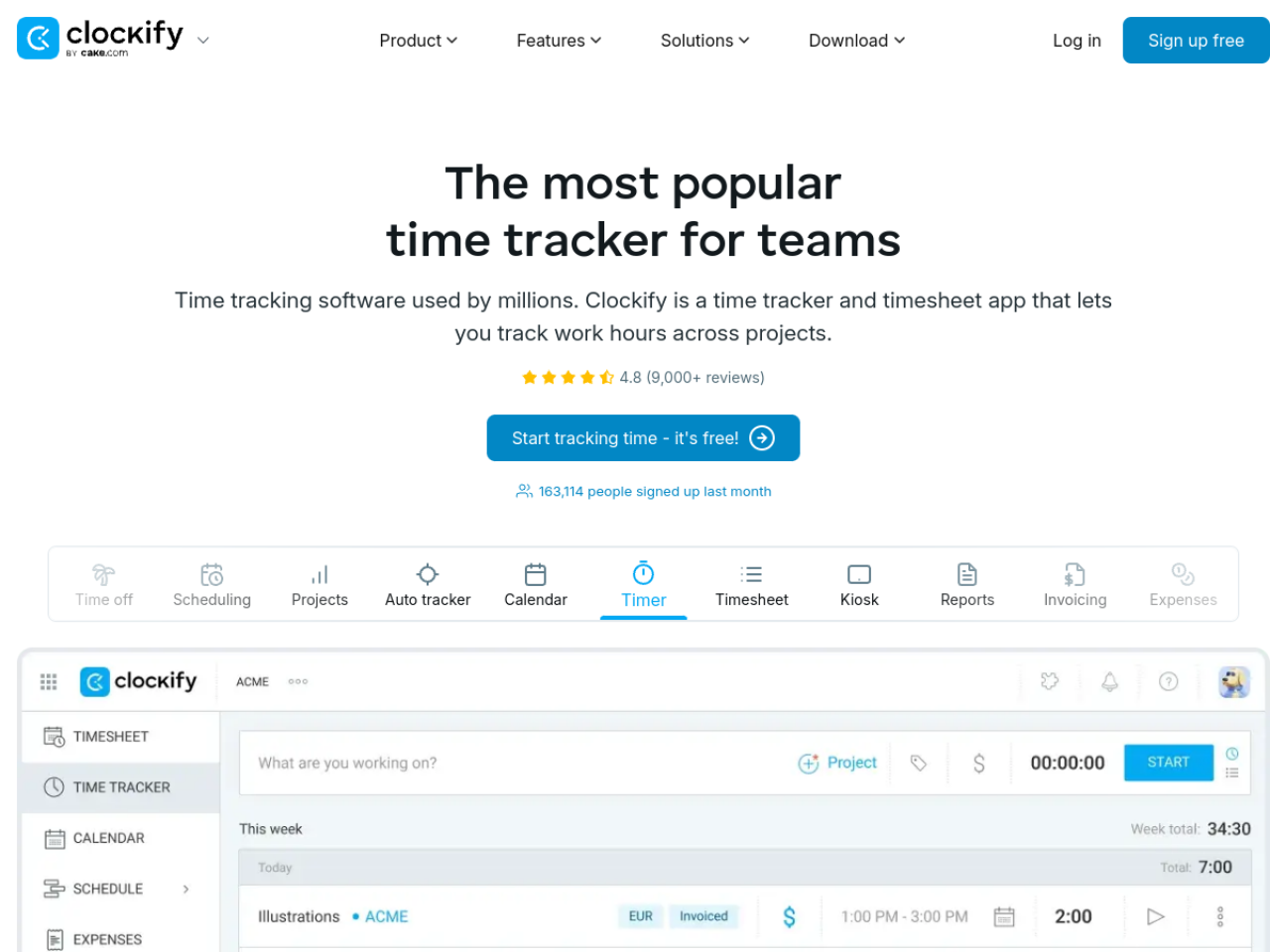
Clockify is the most popular time tracker for teams, used by millions of people worldwide to record work hours across projects and clients. Its defining feature is a genuinely free plan with unlimited users, which makes professional time tracking accessible to everyone from solo freelancers to large teams without a per-seat bill.
What is Clockify?
Clockify lets anyone track time with a one-click timer, manual timesheet entry, a calendar view or automatic tracking, then turns those hours into reports, invoices and payroll. Around the core timer it adds project and budget tracking, billable rates, approvals, scheduling, time-off and expense tracking — a full work-time toolkit rather than just a stopwatch.
Who it's for
Clockify serves a wide range of professionals: freelancers, agencies, developers, consultants, lawyers, accountants and construction companies, plus general business teams. Anyone who needs to know where time goes — to bill clients accurately, run payroll, or simply understand productivity — is a good fit, and the free unlimited-user plan makes it viable at any team size.
Key features
- Timer, manual timesheets, calendar view and automatic tracking
- Kiosk clock-in for shared devices
- Reporting on time, activity, rates, earnings and project budgets
- Billable rate management and invoicing
- Scheduling, time-off management and approval workflows
- Expense tracking and payroll calculations
- Location tracking for field teams
Free for unlimited users
Clockify's biggest differentiator is its pricing model. The free plan supports unlimited users and unlimited projects, so a whole team can track time at no cost — a rarity in this category, where most tools charge per user. Paid tiers (Basic, Standard, Pro, Enterprise) add advanced features like approvals, invoicing depth, scheduling and admin controls, but the core time tracking never sits behind a paywall.
From hours to invoices and payroll
Clockify closes the loop between tracking and getting paid. Billable rates turn logged hours into client-ready invoices, while payroll calculations and approvals help pay staff accurately. Detailed reports break time down by project, client, task or team member, so managers can see budget burn, spot unprofitable work, and bill for every hour that was actually worked rather than guessing. Approval workflows let managers review and sign off timesheets before they turn into invoices or payroll, keeping the numbers accurate.
Works everywhere
Clockify runs across desktop (Windows, Mac, Linux), the web (Chrome, Firefox, Edge extensions) and mobile (iOS, Android), plus a kiosk mode for shared clock-in devices. That breadth means an office worker, a remote developer and an on-site crew can all track time the way that suits them, with everything syncing to the same account. Automatic tracking and browser extensions can even capture time in the background, so hours are recorded accurately without anyone having to remember to start a timer.
Reliable and supported
For a tool teams depend on daily, reliability matters: Clockify advertises a 99.99% uptime guarantee and 24/7 customer support, and carries a 4.8-star rating across more than 9,000 reviews. That combination of dependability and genuine free access is why it has become the default time tracker for so many teams.
Why choose Clockify
For anyone who needs to track time — whether to bill clients, run payroll or understand where the workday goes — Clockify is one of the easiest recommendations available. Free for unlimited users, packed with reporting, invoicing and management features, and available on every device, it delivers professional time tracking without the per-seat cost that makes competitors expensive to roll out across a team.
Tags
Ratings & reviews
5.0
1 rating
1 review
dylanVerified
Jul 24, 2026
Love this Serbian product from Milos!
Similar softwares
GetWill
Online wills, Lasting Powers of Attorney and probate support for England and Wales, with solicitor review and guided workspaces.
LandOffer
Free job discovery, application autofill, and AI answer drafts for user review.
Foreclosure Data Hub
Search daily U.S. foreclosure and REO data, track new matches, research owners, and export leads to CSV or Google Sheets.
Compare Clockify
Similar software
Vega IT
Vega IT is a software development company working at the cutting edge of digital product development. Find out how we've helped businesses in your industry
Toggl Track
Effortless time tracking with powerful reports to see where your team's hours (and profit) actually go.
PersonaHaven
Personality tests and practical tools for deeper self-reflection and personal growth.

OrgChart App
Create, manage, and share organizational charts for free with BALKAN OrgChart App. Visualize your company structure and keep your team connected.
QuoteBoundary
Free browser toolkit for freelancers to price work, define scope, and handle changes without signup or uploads.
Harvest
Time tracking and invoicing that turns billable hours into paid invoices, with profitability reporting.
Related reads

Best Free Online PDF Tools for Everyday Document Tasks
Free browser-based tools to compress, merge, split, convert, organize and analyze PDF files.

Free Online PDF Tools: Convert, Merge, Split & Compress PDF Files
Discover easy-to-use free online PDF tools for converting, merging, splitting and compressing PDF files without installing complicated software

How to Validate a Product Idea Before You Build It
A practical guide to validating your product idea with AI, market research, customer insights, and a simple Build, Modify, or Kill framework.
Community discussion (0)
Ask questions, share tips, or compare notes with other Clockify users.